
Table of Contents
Why The Slider Versus Hero Banner Debate Still Matters
The first screen of a website carries more weight than most people admit. It shapes trust, explains the offer, guides the next click, and often becomes the largest visual element that loads on the page. That is why the choice between a slider or hero banner is not only a design decision.
From an SEO point of view, the above-the-fold area affects speed, crawl clarity, user behavior, accessibility, and conversion flow. Google does not rank a page simply because it uses a hero banner or a carousel. But the implementation can affect Core Web Vitals, content visibility, and how quickly users understand the page.
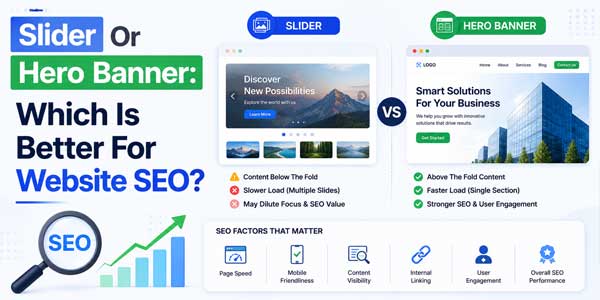
A website slider rotates multiple messages in the same space. A hero banner usually presents one focused message, one strong visual, and one clear call to action. Both can work in the right context, but for most SEO-focused websites, a well-built hero banner is the safer and stronger option.
The issue is not that every slider is bad. The issue is that many sliders are heavy, slow, distracting, and poorly optimized for mobile users. They often load multiple large images, delay the main headline, create layout shifts, and bury the most important message behind a rotating panel.
This guide explains which option is better for SEO, when a slider still makes sense, and how to design the top section of your website without hurting rankings, user experience, or conversions. The goal is simple: choose a layout that helps people and search engines understand your page faster.
What Is A Hero Banner In Website Design?
A hero banner is the main visual section at the top of a page. It normally includes a headline, short supporting text, a call-to-action button, and one image, illustration, video thumbnail, or background graphic. It is designed to communicate the page’s primary value in a few seconds.
On a homepage, the hero banner may explain what the business does. On a service page, it may highlight the service promise. On a product page, it may introduce the product benefit. On a blog page, it may present the title, category, author, date, or featured image.
The best hero banners are not just pretty. They are strategic. They place the most important text in crawlable HTML, use a compressed and correctly sized image, avoid unnecessary animation, and make the next action obvious. This creates a smoother experience for users and search engines.
A hero banner also gives designers more control. Instead of forcing several messages into one rotating component, the page can focus on one search intent. That matters because SEO pages should have a clear topic, clear hierarchy, and content that matches what the visitor expected after clicking a result.
For many websites, the hero section becomes the Largest Contentful Paint element. Google’s Core Web Vitals guidance defines LCP as the loading performance metric for the main content, and the recommended target is within 2.5 seconds. A lean hero banner is usually easier to optimize for that target.
What Is A Website Slider Or Carousel?
A website slider, also called a carousel, is a rotating area that shows multiple slides in the same position. Each slide may contain a different image, headline, offer, button, product, promotion, or campaign. Sliders are common on ecommerce homepages, agency websites, portfolios, and corporate landing pages.
The appeal is easy to understand. Stakeholders want to show many things at once. Marketing wants one offer. Sales wants another. Product teams want announcements. Designers want motion. A slider appears to solve the internal conflict by giving everyone a turn in the top section.
The problem is that users do not always wait for each slide. Many people scroll quickly, especially on mobile. If the most important offer appears on slide three, a large part of the audience may never see it. That can weaken both conversion clarity and content priority.
Sliders can also create technical weight. Multiple high-resolution images, JavaScript libraries, touch controls, transitions, dots, arrows, and autoplay logic can increase page load time. If not handled properly, the slider can delay rendering and damage the first impression.
A slider is not automatically harmful. A lightweight, accessible, manually controlled carousel can be useful in specific cases. But as the main SEO section of a page, it needs careful planning. Otherwise, it becomes a decorative feature that creates more problems than value.
Which Is Better For SEO: Slider Or Hero Banner?
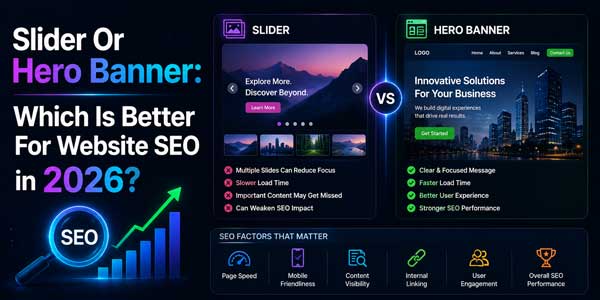
For most websites, a hero banner is better for SEO than a large autoplay slider. The reason is not that Google prefers one design pattern by name. The reason is that a hero banner is usually faster, clearer, easier to crawl, easier to optimize, and better aligned with one primary search intent.
Search engines need to understand the page topic. Users need to understand the offer. A focused hero section supports both. It can include one strong heading, one keyword-relevant message, one optimized image, and one call to action. This creates a cleaner top-of-page experience.
A slider often divides attention. It may show five campaigns, five headings, and five different calls to action. That can dilute the page message. If the first slide is image-heavy and the important text is embedded inside the image, both accessibility and SEO clarity can suffer.
Performance is another major factor. A hero banner normally needs one main image or graphic. A slider may load several. If all slides load immediately, the page becomes heavier. If slides load lazily but the first slide is delayed, the first visible content may still suffer.
That said, sliders can work for ecommerce promotions, real estate galleries, travel packages, portfolio previews, and event highlights when they are built responsibly. But for service pages, landing pages, SaaS pages, local business pages, and most SEO-targeted pages, the hero banner is usually the better choice.
- Choose A Hero Banner when the page has one main offer, service, product, or search intent.
- Use A Slider Carefully when users genuinely need to compare multiple featured items in the same section.
- Avoid Autoplay Sliders when they distract users, shift content, or delay the main message.
- Never Put Critical Text Only In Images because users, screen readers, and search engines need real HTML text.
How Sliders Can Hurt SEO And User Experience
The biggest SEO concern with sliders is performance. Many sliders load large images, unused scripts, fonts, animations, and styling before the user can interact with the page. This can increase load time and hurt the user’s first experience, especially on mobile networks.
Core Web Vitals make this issue more visible. Google recommends good LCP, INP, and CLS thresholds for user experience. A heavy slider can affect all three: slow image loading can hurt LCP, complex JavaScript can affect responsiveness, and changing slide dimensions can trigger layout shift.
Another issue is message visibility. If a slide contains an important heading but it appears after several seconds, the user may never read it. Search engines may render the page, but users still make fast decisions. SEO success depends on satisfying real users, not only making content technically present.
Autoplay can also be frustrating. A slide may change while the user is reading. A button may move before the user taps it. Motion can distract or even create accessibility problems for some visitors. A design that looks active in a presentation can feel annoying on a real phone.
Sliders also make analytics harder. If a homepage has five rotating messages and conversion drops, which message caused the problem? Did users see slide one only? Did they click slide three? Was slide four too slow? A single hero banner creates cleaner testing and more reliable decision-making.
Common Slider Problems That Affect SEO
Many slider issues are avoidable, but they appear often in real websites. The most common problems include oversized images, missing alt text, text inside images, poor mobile cropping, weak contrast, hidden headings, autoplay without controls, and scripts that block rendering.
Some sliders also load below-the-fold slides too early. That means the browser spends bandwidth on images the user may never see. On mobile, this can be expensive. If the first screen loads slowly, users may bounce before reading your content or interacting with your offer.
How Hero Banners Support Better SEO Performance
A hero banner works well because it keeps the page focused. One main headline can match the page’s keyword intent. One short paragraph can explain the value. One optimized visual can support the message. One call to action can guide the next step without forcing users to wait.
From a technical perspective, a hero banner is easier to optimize. You can compress the main image, serve it in WebP or AVIF, define width and height, preload it when needed, and avoid lazy-loading the LCP image. Web.dev warns that lazy-loading the LCP image can delay loading and harm LCP.
A hero banner also makes accessibility easier. The heading can be real text. The button can have a clear label. The image can have descriptive alt text or an empty alt attribute if decorative. There is less motion, less hidden content, and fewer controls for keyboard users to navigate.
For conversions, a hero banner creates a clear path. Visitors know what the page is about and what to do next. That matters because SEO traffic is not valuable unless users take meaningful actions, such as reading, subscribing, requesting a quote, adding to cart, or contacting the business.
The strongest SEO pages usually have a simple pattern: clear top message, fast loading, visible content, strong internal links, helpful body content, and a natural next step. A hero banner supports that pattern better than a complex carousel in most cases.
- Use One Main H2 Or Page Heading Area with clear, crawlable text above the fold.
- Compress The Hero Image and serve responsive sizes for desktop, tablet, and mobile.
- Avoid Lazy-Loading The First Hero Image when it is likely to be the LCP element.
- Reserve Space For Images with width, height, or aspect-ratio rules to reduce layout shift.
When A Slider Still Makes Sense
A slider can still be useful when the user expects to browse options. Ecommerce stores often use sliders for featured categories, seasonal campaigns, brand highlights, or product collections. Real estate websites may use sliders for property images. Travel websites may use them for destination previews.
The key is placement. A slider does not always need to be the first thing on the page. Often, the best setup is a clear hero banner at the top and a carousel lower on the page for supporting content. This keeps the primary SEO message focused while still allowing visual browsing.
Manual sliders are usually better than autoplay sliders. Let users choose when to move to the next slide. Provide clear arrows, visible dots, keyboard support, pause controls if motion exists, and accessible labels. The slider should serve the visitor, not force movement on them.
Sliders work best when each slide has a similar purpose. A product carousel with related items is easier to understand than a mixed carousel that shows a sale, a testimonial, a blog post, a founder message, and a contact form. Consistency improves both UX and measurement.
If you use a slider, test it like any other important feature. Track clicks per slide, engagement, scroll depth, conversion rate, mobile performance, and Core Web Vitals. If most users only interact with the first slide, that is a sign to simplify the layout.
Best Use Cases For Sliders
Sliders are better for browsing than persuasion. They can help users explore multiple images or product options after the main message is already clear. They are weaker when used as the only place for important sales copy, SEO headings, or essential navigation.
A good rule is simple: if the message is critical, do not hide it in slide two, three, or four. Put it in visible HTML content. Use the slider only for supporting visuals, optional promotions, or collections that users can explore at their own pace.
SEO-Friendly Design Rules For Hero Banners And Sliders
Whether you choose a slider or hero banner, the same SEO rules apply. The design must load quickly, show important content clearly, work on mobile, support accessibility, and avoid blocking search engines from understanding the page. Beauty alone is not enough.
Keep text as HTML whenever possible. Do not place your main headline, offer, and call to action only inside an image. Search engines can process images in many ways, but real text is still better for clarity, accessibility, responsiveness, and editing.
Use one primary message above the fold. If the page is about custom web development, say that clearly. If the page is about a product collection, make that clear. A visitor should not need to wait through animation to understand why the page exists.
Optimize image delivery. Use modern formats, responsive image sizes, compression, proper dimensions, and a CDN when useful. The first visible image should be treated as a performance priority. Below-the-fold images can be lazy-loaded, but the main hero image should be handled carefully.
Make interactive elements accessible. Buttons should be real buttons or links. Slider controls should work with keyboard navigation. Motion should be controllable. Text should have strong contrast. Mobile tap targets should be large enough for comfortable use.
- For SEO: Use crawlable headings, natural copy, internal links, and clean image alt text.
- For Speed: Reduce scripts, compress images, avoid render-blocking assets, and measure LCP.
- For UX: Keep the main message visible, avoid sudden movement, and design for mobile first.
- For Conversion: Use one primary call to action and test whether users actually click it.
How To Choose The Right Option For Your Website
The best choice depends on the purpose of the page. If the page is built for SEO traffic from a specific keyword, use a focused hero banner. If the page is built for browsing multiple visual items after the user arrives, a slider can be added lower on the page.
For a service business website, a hero banner is usually the right choice. The visitor wants to know what you offer, why you are credible, and what step to take next. A rotating slider can delay that clarity and create unnecessary design weight.
For an ecommerce homepage, the answer is more flexible. A simple hero banner can promote the main sale, while product carousels below can show categories, best sellers, new arrivals, or seasonal products. This gives marketing space without sacrificing the main message.
For blog and content websites, avoid heavy sliders at the top. Readers usually want the article title, topic, date, author, and content quickly. If you use featured post carousels, keep them lightweight and make sure they do not push useful content too far down.
For SaaS and startup websites, a hero banner is almost always better. The product value proposition needs to be understood quickly. A slider with multiple abstract messages can weaken positioning. One strong headline, one product visual, and one clear CTA usually perform better.
A Practical Decision Framework
Ask three questions before choosing. First, does the page have one primary search intent? Second, will multiple slides improve the user’s decision or only satisfy internal stakeholders? Third, can the design meet good Core Web Vitals on mobile? Your answers will usually point to the right layout.
If the page needs clarity, choose a hero banner. If the page needs exploration, use a carousel carefully. If the page needs both, use a hero first and place a lightweight slider after the first meaningful content section.
Final Recommendation: Use A Hero Banner First, Slider Second
For SEO-focused websites, the best default is a fast, focused, mobile-friendly hero banner. It gives users a clear message, helps search engines understand the page, reduces performance risk, and makes conversion testing easier. It is not trendy; it is practical.
A slider should be treated as a supporting component, not the foundation of your SEO strategy. Use it when it helps users browse related content or products. Avoid it when it hides important copy, slows the page, creates motion problems, or confuses the main offer.
The first screen of your website should answer three questions quickly: What is this page about? Why should the visitor care? What should they do next? A good hero banner answers those questions better than most sliders.
In 2026, SEO rewards pages that are helpful, fast, accessible, and easy to understand. A hero banner supports those goals naturally. A slider can support them only when it is lightweight, controlled, relevant, and placed with purpose.
Frequently Asked Questions
Is A Slider Bad For SEO?
A slider is not automatically bad for SEO, but it can hurt performance, clarity, accessibility, and conversions if built poorly. Heavy images, autoplay, hidden text, layout shifts, and slow JavaScript can create problems. A lightweight, accessible, manually controlled slider is safer.
Is A Hero Banner Better Than A Slider For SEO?
Yes, in most cases a hero banner is better than a slider for SEO because it is clearer, faster, easier to optimize, and better for one primary search intent. It helps users understand the page quickly and reduces the risk of delayed content or heavy scripts.
Can I Use A Slider On An Ecommerce Website?
Yes, ecommerce websites can use sliders for featured products, categories, seasonal campaigns, or brand promotions. For better SEO and UX, keep the main message visible, avoid loading every slide image upfront, and place product carousels below a clear hero section when possible.
Should The Hero Image Be Lazy-Loaded?
No, the main hero image should usually not be lazy-loaded if it is the Largest Contentful Paint element. Delaying that image can hurt LCP. Lazy loading is better for below-the-fold images that users will see later as they scroll.
What Is The Best Above-The-Fold Layout For SEO?
The best above-the-fold layout for SEO includes a clear headline, short supporting copy, one primary call to action, a fast optimized image, crawlable HTML text, and stable spacing. It should load quickly, work well on mobile, and match the visitor’s search intent.







![5-Best-WordPress-Plugins-For-Restaurants-[2026]](https://www.exeideas.com/wp-content/uploads/2026/09/5-Best-WordPress-Plugins-For-Restaurants-2026-300x150.jpg)




Be the first to write a comment.