
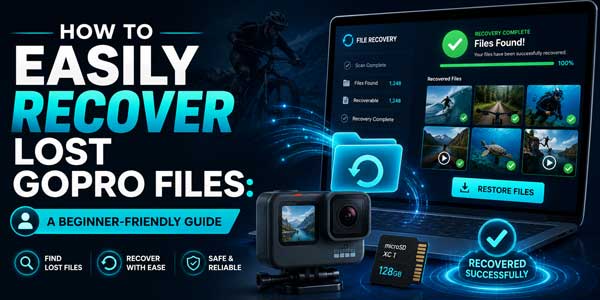
GoPro cameras are built for adventure. They let us capture stunning underwater scenes, snowy slopes, and rugged terrains- footage that ordinary devices simply can’t handle. But even with their rugged build, we’ve learned the hard way that GoPro videos and photos can still vanish unexpectedly. Whether it’s an old SD card, accidental deletion, or a formatting mishap.
The good news? Modern software has made this problem solvable. With the right GoPro file recovery software, we can retrieve lost data, whether it’s mistakenly deleted videos, missing files, or even footage from a formatted card. In this article, I’ll introduce you to a trusted GoPro recovery software for 2026. This tool is safe, beginner-friendly, and fully compatible with Windows operating systems. If you’ve ever wondered how to recover deleted files in Windows 11 after a GoPro mishap, you’re in the right place.
Table of Contents
Why You Need GoPro Recovery Software?
Losing GoPro footage is frustrating, especially when those clips have personal or professional value. I’ve tried the old trick of reinserting the SD card, but it rarely works. That’s why reliable GoPro recovery software is essential. These tools scan memory cards, drives, and USB devices to locate lost data, giving us a real chance to restore permanently deleted files.
Why Use GoPro Recovery Tool? Key Reasons Explained
- They recover deleted or missing footage, whether we accidentally erased it, lost it during transfer, or formatted the card.
- They handle fragmented video files. Because GoPro uniquely writes data, fragmentation is common during long recordings.
- They support GoPro formats like MP4, HEVC, and RAW, ensuring compatibility and accurate recovery.
- The interfaces are simple and guide us step-by-step; no technical expertise required.
- Supports preview videos for free before recovering, so we know exactly which files we are restoring.
Best GoPro Data Recovery Software in 2026:
There are plenty of recovery tools out there, but few are truly reliable for GoPro cameras. After testing several, I’ve found that RecoveryFox AI stands out as one of the most dependable options. Developed by WonderFox Soft. It helps me restore lost photos, 4K videos, and audio files from GoPro SD cards and external storage devices.
RecoveryFox AI works on all Windows devices, supports over 500 file types, and offers both “Quick Scan” and “AI Scan” modes. The best part? We can preview lost files for free before committing to recovery. Also, its clean interface makes it perfect for beginners.
Key Features:
- Advanced AI scanning mode
- Built-in video preview
- Supports GoPro SD cards and external drives
- Fast, accurate smart filtering to locate files quickly
- Compatible with Windows 11/10/8.1/8/7/Vista, and Windows Server 2022/2019/2016/2012/2008/2003
✅ Pros
- Extremely easy to use
- Recovers deleted videos, audio, photos, and more
- Works on formatted memory cards
❌ Cons
- No Mac version available
Lost GoPro Video and Photo Files? Try RecoveryFox AI:
Picture this: You went scuba diving and captured breathtaking underwater footage with your GoPro. Back home, you inserted the SD card into your laptop, only to see “No files found.” Panic set in. You tried again, but nothing appeared.
At this point, you need to find a solution quickly. RecoveryFox AI is one of the best GoPro data recovery tools, trusted by thousands of creators. Whether files were accidentally deleted, formatted, or lost videos, this tool handles it all. It performs AI deep scans on SD cards to recover videos that seemed permanently gone.
What I love most is how approachable it is. We don’t need any technical background; just open the software, run a scan, and recover. Here’s why I keep recommending it:
Why Choose RecoveryFox AI?
- Fast and precise recovery
- Works with SD cards, external hard drives, and various cameras
- Includes a built-in video preview tool
- Simple, intuitive interface
- Advanced security and data protection
4 Simple Steps to Recover GoPro Files with RecoveryFox AI:
Step 1. Launch RecoveryFox AI and connect your GoPro SD card or the device storing your videos. Select the correct drive from the main interface.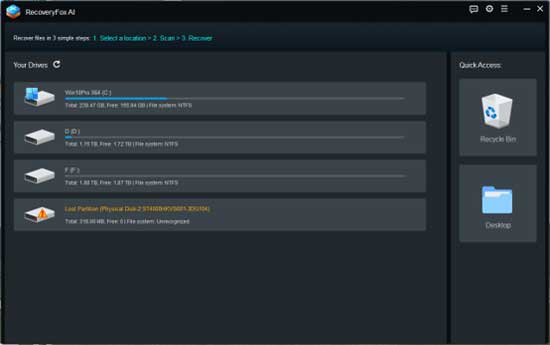
Step 2. Click “Start Scan” to begin scanning the selected device.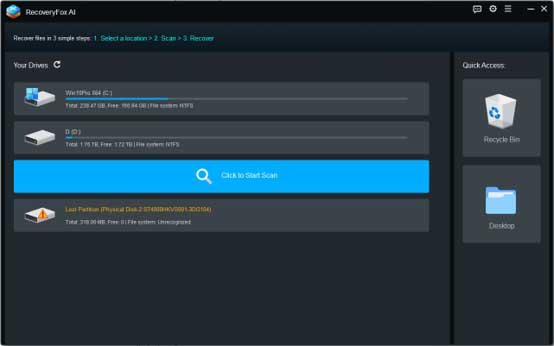
Step 3. The tool performs both Quick Scan and AI Scan to thoroughly find deleted, lost, or formatted video files. You can pause anytime, but letting it run fully ensures the best results.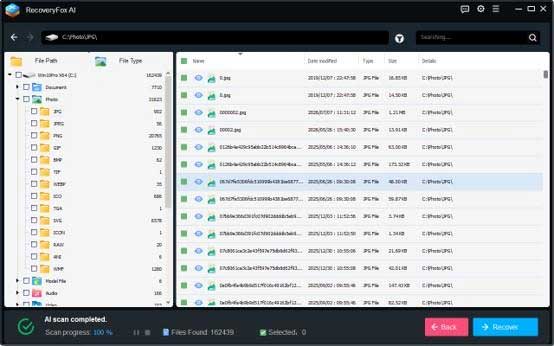
Step 4. After scanning, browse the recoverable file list. Use the preview feature to confirm each video before recovery. Select the files you need and click “Recover” to save them to a safe location, never back to the original SD card.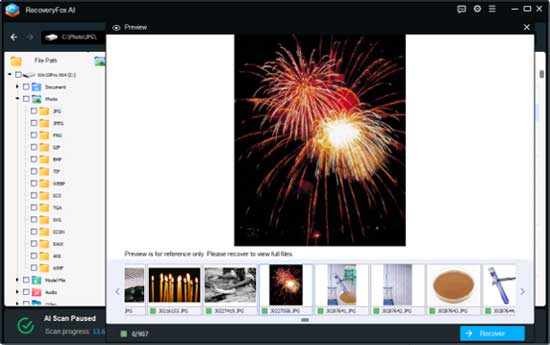
And just like that, your files are back. It’s that simple, which is exactly why RecoveryFox AI is among the best GoPro recovery software in 2026.
Pro Tips for Successful GoPro Video Recovery:
Over time, I’ve learned a few best practices that make GoPro data recovery much more effective. Follow these tips to prevent data loss and simplify future recoveries:
- Stop using the SD card immediately to avoid overwriting lost or damaged data.
- Use reliable recovery software that supports GoPro file formats (like Recuva, Disk Drill, or RecoveryFox AI).
- Connect the SD card via a card reader instead of directly through the camera for better access and compatibility.
- Run an AI scan to find fragmented or partially deleted files; don’t rely solely on a quick scan.
- Do not format the memory card until you’ve tried all recovery methods.
- Back up recovered files to another drive or cloud storage to prevent future loss.
Following these simple guidelines not only ensures a smoother recovery process but also protects our footage long-term.
Conclusion:
GoPro cameras let us capture the world in motion, but even the most reliable gear can experience data loss. That’s why data recovery software is so important. With RecoveryFox AI, we can safely restore our videos without stress.
RecoveryFox AI strikes the perfect balance between power and simplicity. If you’re looking for an all-in-one solution to recover deleted files in Windows 11 or restore permanently deleted files from your GoPro, this tool is your top recommendation. It’s secure, effective, and incredibly easy to use, which is why it’s trusted by most users as the go-to GoPro file recovery software in 2026.
 About the Author:
Jenny writes about RecoveryFox AI and other technology solutions, focusing on software, digital tools, and data recovery. She creates clear and practical content to help readers better understand file recovery solutions.













Be the first to write a comment.