
Table of Contents
Why Static Websites Need Discovery Files
Static websites are fast, secure, and easy to host, but they do not automatically behave like a full CMS. A WordPress site may generate feeds, sitemaps, archives, and update signals by default. A static website often needs those files created during the build process or added manually.
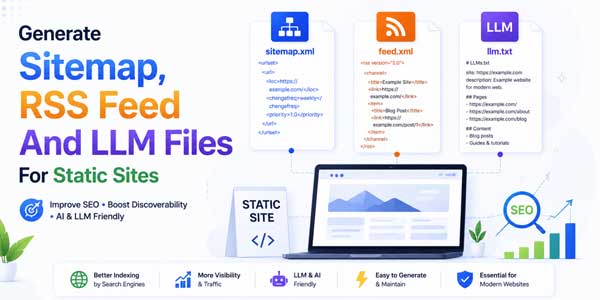
That is where sitemap.xml, RSS feed, and LLM files become useful. These files help search engines, readers, feed apps, automation tools, and AI systems understand what exists on your site, what changed recently, and which pages deserve attention.
A static website can rank without these files, but relying only on navigation links is not ideal. Important pages may be buried. New blog posts may take longer to discover. AI tools may struggle to find clean summaries. Content distribution becomes harder when your site has no machine-readable update layer.
The goal is not to create files for decoration. The goal is to make your static site easier to crawl, subscribe to, reference, and maintain. A strong technical setup gives every important page a clear path: one for search engines, one for readers, and one for emerging AI discovery workflows.
For modern SEO, these files work together. The sitemap is the full map. The RSS feed is the recent update stream. The LLM file is a curated guide for language-model tools and AI-assisted browsing. When all three are clean, your static site becomes easier for both humans and machines to understand.
Understand The Role Of Sitemap, RSS Feed, And LLM Files
Before generating anything, it helps to understand what each file does. A sitemap.xml file lists important URLs on your website. It helps search engines discover pages and understand when they were last modified. It is especially helpful for large sites, new sites, and pages with weak internal links.
An RSS feed is different. It usually lists recent posts, updates, articles, episodes, or resources. It is useful for readers, newsletter tools, content aggregators, and search discovery. RSS or Atom feeds are not full replacements for sitemaps because they normally include only fresh content.
An LLM file, usually called llms.txt, is a newer proposed convention. It is designed to provide LLM-friendly guidance about your website, often in plain text or Markdown. It can point AI tools toward your best documentation, product pages, policies, tutorials, and summaries.
These files answer different questions. A sitemap says, “Here are the URLs on this site.” An RSS feed says, “Here is what was published or updated recently.” An LLM file says, “Here is the important context that AI tools should read first.” Together, they create a cleaner information layer.
- Sitemap.xml: Helps search engines discover and crawl important URLs.
- RSS Feed: Helps readers, apps, and platforms follow fresh updates.
- Llms.txt: Helps AI tools find curated, high-value website context.
- Robots.txt: Helps crawlers find your sitemap and understand allowed paths.
For a static website, you can generate all of these from one source of truth: your content files. If your pages are stored as Markdown, JSON, YAML, MDX, or HTML, a build script can read metadata and generate the files automatically whenever you deploy.
Plan Your Static Website Content Structure First
Good output files start with organized content. If your static site has inconsistent slugs, missing titles, empty dates, duplicate URLs, or random folders, your sitemap and RSS feed will also be messy. Technical SEO becomes much easier when your content has predictable metadata.
Every important page should have a clean URL, a title, a description, a canonical path, and a last updated date. Blog posts should also include a publication date, author, category, tags, and excerpt. These fields allow your generator script to create accurate sitemap entries and feed items.
For static site generators, the best practice is to keep front matter at the top of every content file. This could be YAML, TOML, or JSON. For custom static sites, you can store page data in a single JSON file and use it to generate HTML pages, sitemap entries, and feed items together.
Do not include every file in your sitemap. Utility pages, test pages, duplicate tag archives, filtered URLs, search result pages, admin files, and private downloads should be excluded. Your sitemap should list pages that are useful, indexable, canonical, and intended for search visitors.
The same logic applies to RSS. Do not add every static page to the feed. Add content that people would reasonably subscribe to: blog posts, tutorials, news updates, podcast episodes, changelogs, release notes, or case studies. A feed should feel fresh and useful, not like a random URL dump.
Recommended Metadata Fields
For most static websites, a simple metadata model is enough. Keep it consistent across pages and posts. If you later move to Astro, Next.js, Hugo, Eleventy, Jekyll, Gatsby, or another generator, this structure will still be easy to adapt.
- title: The visible page title or post title.
- slug: The clean URL path in lowercase words and dashes.
- description: A short summary for feeds, previews, and SEO checks.
- publishedDate: The original date for posts and articles.
- updatedDate: The last meaningful content update date.
- canonicalUrl: The final preferred URL for the page.
Once these fields are reliable, automation becomes simple. Your script can generate a full sitemap, a recent RSS feed, and an LLM guide from the same data. That reduces manual mistakes and keeps your static website easier to maintain.
How To Generate A Sitemap.xml File
A sitemap is usually the first file to generate. It should be placed at a stable URL such as /sitemap.xml. Search engines can discover it through Google Search Console, Bing Webmaster Tools, direct submission, or a line inside your robots.txt file.
The basic XML format includes a URL set, each page URL, and optional metadata such as last modification date. The loc value should use the full canonical URL. The lastmod value should change only when the page content changes meaningfully, not every time you rebuild the site.
Do not overuse changefreq or priority. Many search systems do not rely heavily on those fields, and inaccurate values can make the sitemap look careless. A clean list of canonical URLs with accurate lastmod dates is usually better than a bloated sitemap full of guesses.
For a small static site, you can generate sitemap.xml manually. For anything with regular content updates, use a script during deployment. The script should read your page metadata, filter out noindex or draft pages, normalize URLs, sort entries, and write valid XML.
Here is the logic in plain terms: collect indexable pages, create absolute URLs, attach last updated dates, escape XML characters, write the sitemap file, and upload it with the site. After deployment, test the file in your browser and submit it in search engine webmaster tools.
Sitemap Rules That Matter
Your sitemap should never include broken URLs, redirected URLs, blocked URLs, duplicate versions, or pages that return noindex. If a URL is in the sitemap, it should be a page you want search engines to crawl and consider for indexing.
- Use HTTPS canonical URLs only.
- Include only 200-status, indexable pages.
- Keep URLs lowercase and consistent.
- Update lastmod only after meaningful page changes.
- Split large sitemaps if your site grows beyond sitemap limits.
For image-heavy sites, you may also use image sitemap extensions, but most static business websites do not need that complexity at the start. Begin with a clean standard sitemap, then add advanced sitemap types only when they solve a real discovery problem.
How To Generate An RSS Feed For A Static Website
An RSS feed should usually live at /feed.xml, /rss.xml, or /blog/feed.xml. The exact path is less important than consistency and discoverability. Add feed autodiscovery in your HTML template if your static setup allows it, and link the feed from your footer or blog page.
A good RSS feed includes the site title, site link, feed description, language, last build date, and individual items. Each item should include a post title, canonical link, globally unique identifier, publication date, author when available, category, and short description.
For static sites, you should generate RSS from your posts collection, not from every page. Sort posts by publication date, include the latest 10 to 50 items, and make sure draft content is excluded. If your site publishes rarely, even a smaller feed is fine as long as it is valid.
Decide whether to include full content or summaries. Summary feeds are safer for sites worried about scrapers. Full-content feeds are better for loyal readers who use feed readers. Many business blogs choose summaries with strong titles and clear links back to the original page.
RSS is also useful for automation. Newsletter tools, Slack alerts, content dashboards, and social scheduling systems can pull updates from the feed. That makes RSS more than an SEO file. It becomes part of your content operations workflow.
RSS Feed Quality Checks
After generating the feed, test it with a feed validator. Common errors include invalid XML, unescaped ampersands, wrong dates, missing item links, duplicate GUIDs, broken media URLs, and special characters copied from documents. One small XML error can break the whole feed.
- Use absolute URLs for every item link.
- Keep publication dates in a valid RSS date format.
- Make each GUID stable and unique.
- Do not include draft, private, or noindex content.
- Use clean summaries instead of keyword-stuffed descriptions.
If your static site has multiple content types, you can create separate feeds. For example, a software site may have one feed for blog posts and another for release notes. A publication may create category-specific feeds. Keep the structure simple until your audience needs more options.

How To Create Llms.txt And Other LLM-Friendly Files
The llms.txt file is a proposed format for helping large language models understand a website. It is not a guaranteed SEO ranking factor, and major search systems may or may not use it consistently. Still, it can be useful as a curated, AI-friendly guide to your best content.
Think of llms.txt as a concise map for AI assistants. It should explain what your site is about, who it serves, and which pages are most useful. It can link to Markdown versions of key content, documentation, product pages, policy pages, pricing pages, tutorials, or technical resources.
Unlike sitemap.xml, llms.txt should not list every URL. It should be selective. AI tools do not need a dump of tag archives and thin pages. They need high-quality context. That is why the file works best when it is curated by someone who understands the brand, audience, and content priorities.
A simple llms.txt file can include a short site summary, important sections, key resources, contact or policy links, and optional notes about preferred citations or freshness. Keep it written in plain Markdown-style text so it is readable to both people and machines.
You can also create Markdown copies of your most important pages, such as /llms-full.txt or a folder like /llm-content/. This can make documentation, tutorials, and product information easier to parse, especially when your normal website uses heavy HTML or JavaScript.
Example Llms.txt Structure
A practical llms.txt file might start with the site name, a short description, and a list of recommended URLs. Then it can group content by category. For example: “Documentation,” “Services,” “Pricing,” “Blog Guides,” “Policies,” and “Contact.”
Keep claims accurate. Do not stuff the file with marketing hype, fake authority, or unsupported facts. AI-friendly files should be clear, honest, and useful. If you publish technical content, include version notes and update dates where helpful.
Build Automation For Static Site Generators
The best time to generate sitemap, RSS, and LLM files is during the build. Whether you use Astro, Next.js, Hugo, Eleventy, Jekyll, Gatsby, Nuxt, SvelteKit, or a custom HTML generator, your build pipeline should create these files automatically before deployment.
The workflow is simple. Read your content metadata. Filter published pages. Generate sitemap.xml. Generate feed.xml from recent posts. Generate llms.txt from curated pages. Write the files into the public output folder. Deploy them with the rest of the static website.
For JavaScript-based projects, a Node.js script can read Markdown front matter and write XML and text files. For Python-based builds, a small script can read YAML or JSON metadata and do the same. For Hugo or Jekyll, built-in templates can generate feeds and sitemaps with less custom code.
Set the site URL in one place, such as an environment variable or config file. Do not hardcode your domain in multiple scripts. This prevents staging URLs from accidentally entering production sitemaps, which is a surprisingly common SEO mistake.
Also add validation to your deployment checklist. After each build, confirm that sitemap.xml is valid XML, feed.xml is valid RSS, and llms.txt is reachable as plain text. If your CI/CD system supports it, fail the build when required metadata is missing.
What To Automate In Your Build
Automation should protect you from repetitive SEO errors. It should catch missing titles, invalid dates, duplicate slugs, non-canonical URLs, broken feed items, and draft pages leaking into public files. A static website is only as clean as its build rules.
- Generate sitemap.xml from all canonical, indexable pages.
- Generate feed.xml from recent posts and updates.
- Generate llms.txt from curated high-value URLs.
- Generate robots.txt with a sitemap reference.
- Validate URLs, dates, and duplicate slugs before deployment.
When automation is done well, publishing becomes safer. Writers can focus on content. Developers can focus on templates. Search engines and AI tools receive clean discovery files every time the site changes.
Connect Robots.txt, Canonicals, And Search Console
Your discovery files should not live in isolation. Add your sitemap location to robots.txt using a simple line such as “Sitemap: https://example.com/sitemap.xml.” This helps crawlers find the sitemap even if you do not submit it manually everywhere.
Make sure every sitemap URL matches the canonical tag on its page. If the sitemap says one URL and the canonical tag says another, you create mixed signals. Static sites often develop this problem after changes to trailing slashes, lowercase paths, index.html handling, or www versus non-www settings.
Submit the sitemap in Google Search Console and Bing Webmaster Tools. Submission does not guarantee indexing, but it gives you useful reports about discovery, processing errors, and crawl status. It also helps you notice when a sitemap suddenly breaks after a deployment.
RSS feeds can also be submitted where supported or linked from the site. They are often discovered by readers and tools through HTML feed autodiscovery. Keep the feed public, fast, and unblocked. Do not accidentally disallow it in robots.txt.
For llms.txt, place it at the root: /llms.txt. You may also link to it from your footer or documentation page if your audience is technical. Because adoption is still evolving, do not rely on it as your only AI visibility tactic. Treat it as a helpful extra layer.
Testing And Maintenance Checklist
Generating these files once is easy. Keeping them clean is the real work. Static websites often break discovery files after redesigns, routing changes, domain migrations, build script edits, or content model changes. A simple monthly check can prevent long-term SEO issues.
Start by opening each file in your browser. The sitemap should load as XML. The RSS feed should load as XML and validate in a feed reader. The llms.txt file should load as plain text. If any file returns a 404, redirect loop, blocked page, or HTML error page, fix it before promoting new content.
Next, sample the URLs. Pick five sitemap entries and confirm they return 200 status codes, have canonical tags, and are not noindex. Pick five feed items and confirm their links open the correct posts. Review llms.txt and confirm the listed pages still represent your best content.
Watch for duplicate URLs. Static sites can accidentally expose both /page and /page/, both uppercase and lowercase paths, or both /index.html and folder-style URLs. Your sitemap and feed should use one preferred version only.
Review date accuracy too. The lastmod date should reflect meaningful content changes. The RSS publication date should reflect when the post was first published. Updated dates can be included in content or metadata, but do not fake freshness by changing dates automatically on every build.
Final Thoughts: Make Static Websites Easier To Understand
Static websites are excellent for speed, security, and simplicity, but they need a thoughtful discovery layer. A clean sitemap helps search engines find important pages. A clean RSS feed helps readers and tools follow updates. A clean llms.txt file gives AI systems a curated path to your best context.
None of these files replaces useful content, clean architecture, internal links, structured data, or strong technical SEO. They support those foundations. When your pages are valuable and your discovery files are accurate, your site becomes easier to crawl, subscribe to, reference, and maintain.
The smartest approach is automation. Build these files from the same content metadata that powers your static pages. Validate them before deployment. Keep them public, clean, canonical, and current. That turns a static website into a well-organized publishing system.
As search and AI discovery continue to evolve, websites that provide clear machine-readable signals will have an advantage. Not because files alone create rankings, but because clarity reduces friction. And in technical SEO, reducing friction is often what helps good content get found faster.
Frequently Asked Questions
Do Static Websites Need A Sitemap.xml File?
Yes, most static websites should have a sitemap.xml file. It helps search engines discover important canonical URLs, especially when the site is new, has many pages, or has content that is not strongly linked from the main navigation.
Is An RSS Feed Useful For A Static Website?
Yes, an RSS feed is useful when a static website publishes blog posts, news, changelogs, tutorials, podcast episodes, or regular updates. It helps readers, feed apps, automation tools, and search systems discover fresh content more easily.
What Is Llms.txt For Static Websites?
Llms.txt is a proposed plain-text or Markdown-style file that gives AI tools a curated guide to a website’s most important content. For static websites, it can link to key pages, documentation, product information, policies, tutorials, and summaries.
Can Sitemap, RSS, And LLM Files Improve Rankings Directly?
These files do not directly guarantee higher rankings. They improve discovery, clarity, and distribution. Rankings still depend on content quality, technical accessibility, relevance, internal linking, authority, page experience, and how well the page satisfies search intent.
How Often Should I Regenerate These Files?
Regenerate sitemap, RSS, and LLM files every time you publish, update, delete, or move important content. The best setup is automatic generation during your static site build process, followed by validation before deployment.









![5-Best-WordPress-Plugins-For-Restaurants-[2026]](https://www.exeideas.com/wp-content/uploads/2026/09/5-Best-WordPress-Plugins-For-Restaurants-2026-300x150.jpg)


Be the first to write a comment.