
AlHamdulillah…!!! We Design World First Unblockable On Page-Load Full And Only CSS Based POP-UP With Light Box Effect Without JQuery Work On IE+7 And All Major Browsers.
Historical Story Behind This:
Today I am very glad to share this “World First Unblockable On Page-Load CSS POP-UP With Light Box Effect Without JQuery” code with you and that is my life’s biggest achievement that I am going to share with you. As no one can think about it how CSS can do it? But one thing that CSS itself did not know that what can It do…!!! This all become only three words those are “I HATE JQUERY” I really hate JQuery because all know what the hell is JQuery, It Will Increase Your Page Size as a result of your site or blog page time become very high that are bad for both, SEO and Visitor. SEO check the blog or site loading time as you also know and due to this you can get higher ranking and on other way you visitor also get upset because 75% of worlds are using slow internet connection due to poverty or not provided better services. So that’s all the problem from which I also get upset but one night CSS open my eyes to the end of ideas from where I get this pop up code.
 |
| Click To Enlarge |
Here I have to show you world first CSS Unblockable POPUP with Light Box Effect that is coded by me and my brother (Muhammad Hassan & Muhammad Saalim). We just design this code in less than an hour. There is only four line CSS code with some HTML Code. One more thing have to mention here that it is not CSS3 it just a simple CSS so it can work easily with all browsers Like IE+7. If any code is working properly at IE+7 it means that it will also work on Chrome, FireFox, Opera and Safari etc. So you have not to worry about limitation. It as simple as you cannot imagine so when you have a look below at the code you can easily understand that what I am trying to say. When you have look on it you will experience that even code button is also working on HTML-CSS.

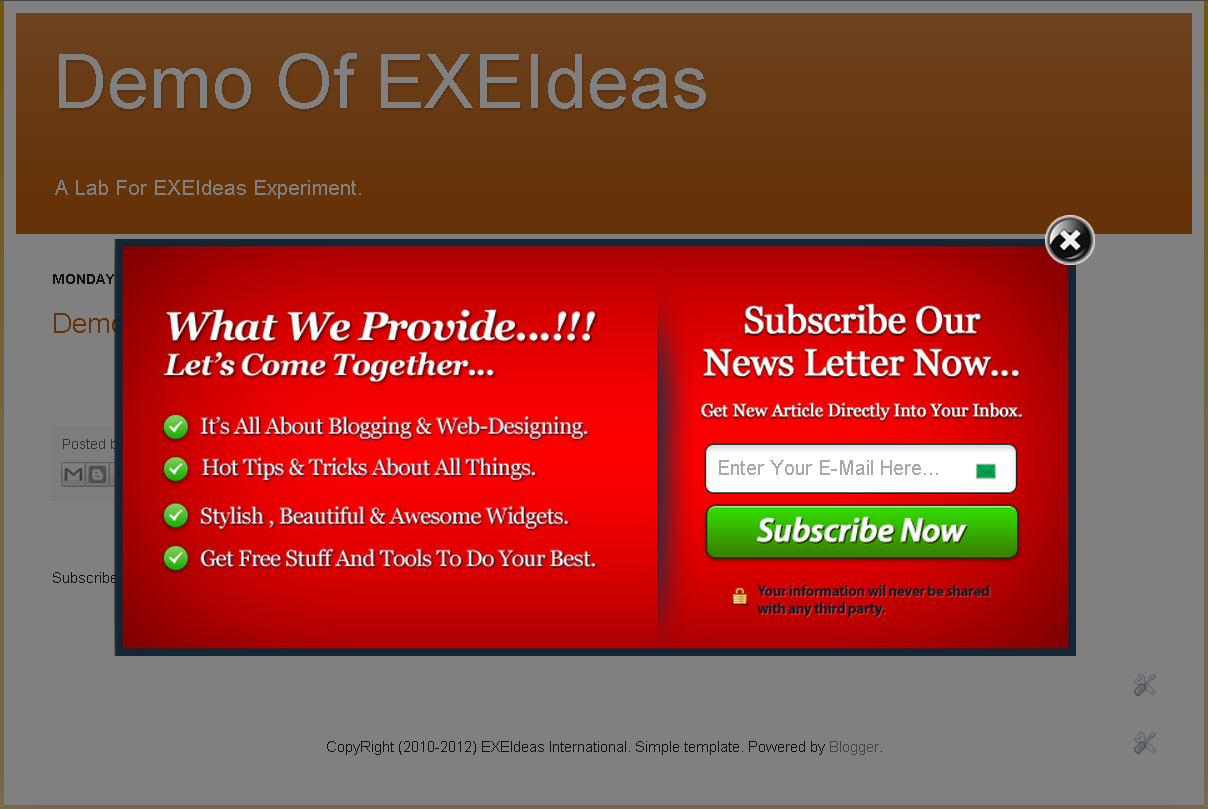
It’s time to over this introductive story and proceeds to that main code that is unique in the world and nobody can imagine or even think about it. First of all have a look on the demo screenshot and demo to ensure the qualities of this popup to your mind that there is no difference with Jquery popup. Here it is also easy to implant and you can easily say that one click implantation. It Is 100 time quick to load with respect to JQuery popup and it never mess up your template. One more thing that this pop up contains only one image has size 999bytes only for light box effect.
Features:
1.) Unblockable By All Browsers (IE+7, Chrome, Safari, FireFox, Opera etc).
3.) Not A Single JQuery File.
4.) Close Button Have Also HTML-CSS Fuction.
5.) Easy To Install And Quick Quick Quick To Load.
6.) Light Box Effect.
7.) World First CSS Based POPUP.
8.) Open On Page Load.
9.) Simple And Full Customizable.
10.) Same Look As JQuery Have.
11.) It Will Not Mess Up Your Template.
How To Add In Blogspot?
1.) Go To Your www.blogger.com
2.) Open Your Desire Blog.
3.) Go To Layout.
4.) Click “Add A Gadget” Where You Want To Add It.
5.) Now Scroll To “HTML-JAVASCRIPT”
6.) Click “+” Icon To Add It.
7.) Now Copy The Below Code And Paste It To There.
8.) Leave The Title Empty.
9.) Click Save, Now You Are Done.
How To Add In Website?
1.) Just Go To Your HTML File.
2.) Now Copy The Below Code And Paste It Between <body> </body>.
3.) Save It, Now You Are Done.
Here Is The Code:
<!-- This Is A CopyRight Code.It Is Free To Use But With HTML Design Code.
If AnyOne Found To Be Changing This Code Should Be Under Legal Action Via DMCA. -->
<style type="text/css">/************************************************ CSS POP-UP With Light Box Effect- © EXEIdeas (www.exeideas.com)* This notice must stay intact for use.* Visit https://www.exeideas.com/ for full source code.***********************************************/* html #exestylepopupdiv {position:absolute;}
@media only screen and (min-width: 600px) {#exestylepopupdiv{display:block;}}
#exestylepopupdiv {z-index: 999999;display:block; top:0px; left:0px; width:100%; height:100%; position:fixed; background-image:url('https://lh3.googleusercontent.com/-rUv4L_9nz-8/T9sfSSJaZNI/AAAAAAAACf0/ETEgFKt-rR4/s128/exeideasopacity0.5.png');margin:0; overflow-y:auto;}
#exestylepopup {background-color: #fff; overflow:none;}
.exestylepopup {width:400px; height:300px; position:fixed; top:50%; left:50%; margin-top:-150px; margin-left:-200px;}
</style>
<!--[if lte IE 6]>
<style type="text/css">
/*<![CDATA[*/
html {overflow-x:auto; overflow-y:hidden;}
/*]]>*/
</style>
<![endif]-->
<noscript>
<style type="text/css">
#exestylepopupdiv{display:none;}
</style>
</noscript><div id="exestylepopupdiv">
<div id="exestylepopup" class="exestylepopup">
<center style="color:#000;cursor:pointer;float:right;margin-right:-20px;margin-top:-20px;" onmouseup="document.getElementById('exestylepopupdiv').style.display='none'">
<img src="https://lh6.googleusercontent.com/-uSW_8HWcJII/T9shJ_kvWwI/AAAAAAAACgI/9xs1KMJtUtc/s40/exeideasclose.png"/>
</center>
+++ Your Text, Pic Vdo, HTML Code, CSS Code, iFrame, Widget Or Anything You Want To Show In The POP UP. +++
</div>
</div>
<!-- This Is A CopyRight Code.It Is Free To Use But With HTML Design Code.
If AnyOne Found To Be Changing This Code Should Be Under Legal Action Via DMCA. -->
1.) First You Don’t Have To Touch OnMouseUp Code Because Tis Is Only For Working Of Close Button.
3.) Then You Also Did Not Have To Touch Second Line Of CSS Because It’s Made To Default To All User Used Only For Light Box Effect.
5.) Here Comes Fourth CSS Line from There You Have To Style Up Your POPUP. Change Width And Height As You Want Then Change The Value Of margin-top Half Of Height As You Can See In The Above Code, Similarly Change The Value Of margin-left To The Half Of Width Value Exactly Even It Comes Into Points Value And Don’t Forget To Add Minus Sign To Them. This Is Only For Alignment Of Your POPUP Into centre For All Size Of Screen All Over The World.
6.) After This Come To HTML Code Where First DIV Is Only For Light Box Effect So Don’t Try To Touch It.
7.) In Second DIV You Will See A Code In <center></center> Tag That Is Close Button. You Can Also Position It Through There CSS In Every Corner Of The POPUP DIV Or Even Can Change It With TEXT.
After This Add Your Text, Pic Vdo, HTML Code, CSS Code, iFrame, Widget Or Anything You Want To Show In The POP UP.
8.) Click Save And Done, Now Enjoy.
Bonus: Get The POP UP Domination For Blogger And Website Here That Is Generated By This Code.
Note: This Code Is Highly Copyrighted Via DMCA And Other Services, You Are Free To Use (Personal And Commercial), Edit And Share But With The HTML Design Code That Will Not Appear In Your POPUP. If Anybody Is Found To Be Thefting Or Without HTML Design Code Is Under Legal Action And If He Is Sharing Via There Site Or Blo Will Be Got Banned By DMCA With Porior Notice Because I Am Telling Yo In Advance.


















amazing man.. it is the best alternative of pop up domaination so far i have ever seen
Thanks…
I can’t Explain How much I liked this widget. Thanks Alot Hassan Bro.
…▄▀▄▀▄▀▄ ▀ Free SEO Tricks ▀▄▀▄▀▄▀▄…
To @Usman Ghani
You Are Welcome Here To Be With US…
Awesome i like it
Thanks…
Hassan are you programmer? i am very glad that you design this for yourself. keep it up.
Just A Code Player, Anyway Thanks Bro…
how to make the pop up appear only in the home page
This Is A Simple POPUP And POPUP Mean That Will Appear On Every Re-Load Of The Page, For One Time Customized POPUP, See Our J-Query Style POPUPs.
realy good tips, I also would lke to share more on my blog http://oyaah.blogspot.in
Feel Free To Share But With A Back-Link…
Hi bro! Im really like this popup, i have it on my pblog and I have sucefully embed my vidostream on it, but is it possible to make this popup work on demand when click on a link? If it is plss tell my how to do it 🙁
Thanks And Wait For The Next HOT Post In Which I Will Full-fill Your Desire…:-)
can u give me the code you put in this popup , the red one with the subscribiton box
These Are Our Hottest EXE-Style POP-Ups 99.99% Similar To POP-UP Domination.
Get A List Of Awesome Design POP-UPs…
POP UP Domination For Blogger And Website
bundle of thanks
You Are Welcome…
I want to one time unblockable popup .
Thaks
Use JQuery POPUP To Show It On Your Desire…
I just want to tell you that I am just beginner to blogs and honestly loved your website. Likely I’m likely to bookmark your blog . You actually come with fantastic posts
Thanks For Bookmarking…
I was just searching for this information for a while. After 6 hours of continuous Googleing, at last I got it in your web site. I wonder what is the lack of Google strategy that do not rank this kind of informative websites in top of the list. Generally the top web sites are full of garbage.
Thanks For Finding Us, Be With Us To Get More Awesome Codes…
Hello, i was trying to set a cookie to show the pop up only once in a week for the visitor. how to achieve this? I dont know anything about javascript for that matter 🙁 pls help me out if u can.
Many thanks
For This Purpose, You Have To Use Over JQuery Version POPUP…
hi i want to ask something .. does it use cookies?? so if a person like me it will not show up again???
or there is a way to use cookies for my like box?
Well It’s Pure CSS So It Didnot Use Cookies That Must Have To Use JQuery, So It Can’t But You Can Visit Our Other POPUP That Contain Cookies Option Too…
Hi Hassan
Shall i use your popup code like with this customization(pls refer demo url)..website is not yet launch.
http://www.learnsourashtri.org/demofinal
awaiting ur replay
with kind regards
karthick
website developer
Thanks For Using It And Yes, You Can Use It But With HTML Design Code…
Hello and Thankyou for the popup. Very clever.
I made a couple of additions, I hope you don’t mind.
The main one was, because the popup requires javascript to be enabled to close the popup, so I stopped the popup being shown to non javascript enabled browsers with a noscript. I cannot add the tag in the comment so will just write the noscript
noscript
style type=”text/css”
.exestylepopup{display:none;}
/style
/noscript
I also stopped the popup on mobiles using an @media css style, so that the popup only showed on screens larger than 600px.
style
@media only screen and (min-width: 600px) {
.exestylepopup{display:block;}
}
/style
Hope you don’t mind my addition.
Your popub is excellent. Thanks again.
Brian
Welcome Here And Thanks For Giving Some Time To Us In This POPUP. We Will Surely Update Our All POPUP Codes. Again Thanks For Your Editing…
It was very interesting for me to read that blog. Thanks the author for it.I like such topics and everything that is connected to them.
Welcome here and thanks for liking our article. Stay with us to get more like this…