
Table of Contents
Why Organic Traffic Numbers Rarely Match Across Tools
Seeing different organic traffic numbers in Google Analytics, Search Console, SEMrush, Ahrefs, Similarweb, server logs, and third-party SEO bots is normal. The problem starts when a team treats every number as the same thing. These tools do not measure the same activity, so they will not report the same result.
Google Analytics measures visits from real users after a tracking tag loads. Third-party bots estimate visibility, crawl pages, read ranking data, model search volume, and sometimes infer visits from keyword positions. Search Console records how Google Search results performed before and after clicks. Server logs record raw requests from humans and machines.
That is why a page can show strong estimated organic traffic in a third-party SEO tool while Google Analytics reports fewer sessions. The SEO tool may be estimating demand from keyword rankings, while GA4 is counting users who actually arrived, accepted tracking conditions, loaded JavaScript, and were classified under Organic Search.
On the other side, GA4 can show organic users from search engines that a third-party bot does not track well. This may include smaller regional engines, image search behavior, AI-assisted discovery, app browsers, or long-tail queries that never appear in a commercial keyword database. Each tool has blind spots.
The right question is not, “Which tool is wrong?” A better question is, “What exactly is this tool measuring?” Once you understand that, the organic traffic difference becomes useful instead of frustrating. Differences can reveal tracking gaps, crawling issues, spam, bot noise, attribution problems, privacy loss, or reporting mistakes.
How Google Analytics Counts Organic Traffic
Google Analytics 4 counts organic traffic when a visitor reaches your site from a source that GA can classify as Organic Search. This classification depends on traffic-source data, referrer information, campaign parameters, Google’s channel grouping rules, and how the session or user acquisition report is configured.
GA4 is event-based, so it does not work like older session-only analytics. A user lands on the site, the GA tag loads, events fire, consent settings are applied, and traffic-source dimensions are assigned. If something blocks the tag, strips the referrer, or changes the source, the organic visit may be missing or placed in another channel.
Organic traffic in GA4 can appear under dimensions such as Session Default Channel Group, First User Default Channel Group, Session Source / Medium, and Landing Page. These reports can answer different questions. One report may focus on acquisition, while another may focus on the current session.
A common mistake is comparing GA4 users to third-party tool visits without checking the dimension. Users, sessions, engaged sessions, views, and key events are different metrics. When the wrong metric is compared, the organic gap looks larger than it really is.
GA4 also filters and processes data. It is designed for user behavior measurement, not full raw crawl visibility. Bot filtering, privacy settings, consent mode, thresholding, ad blockers, JavaScript errors, duplicate tags, cookie limits, and cross-domain issues can all change what appears in reports.
Google Analytics uses channel grouping rules to classify traffic sources. If a visit comes from a recognized search engine and is not tagged as paid, it can be grouped as Organic Search. If the source is missing, broken, overwritten, or tagged incorrectly, the same visit may appear as Direct, Referral, Unassigned, or something else.
How Third-Party Bots Estimate Organic Traffic
Third-party SEO platforms usually do not sit inside your website with a tracking tag. They use crawlers, keyword databases, click-through-rate models, SERP snapshots, rank tracking, backlink indexes, browser panels, ISP data, or mixed data sources to estimate organic traffic. That makes their numbers directional, not exact.
For example, an SEO tool may see that your page ranks number three for a keyword with 10,000 monthly searches. It may apply an estimated click-through rate and report expected visits. That number can be useful for opportunity analysis, but it is not the same as counting people who actually landed on your website.
Third-party bots also crawl your site differently from Google. Some tools crawl only a limited number of pages. Some may miss JavaScript-rendered links. Some may not access blocked directories. Some follow robots.txt strictly, while others use their own crawl logic. A tool’s view of your website may be incomplete.
Keyword databases create another gap. Commercial tools do not know every search query. They are stronger in some countries, languages, and industries than others. A niche website with many long-tail searches may get real GA4 traffic from queries that third-party tools barely track.
There is also timing. A third-party tool may update keyword rankings weekly or monthly. GA4 reports visits daily or near real time depending on the report. If rankings changed recently, or a page was published yesterday, the tool may lag behind what users are already doing.
Bot-based tools are not useless because they estimate. They are useful for competitive analysis, keyword discovery, content gaps, ranking movement, backlink trends, crawl diagnostics, and market comparison. Their job is not to replace GA4. Their job is to show SEO opportunities that your analytics tag cannot see alone.
Major Reasons Organic Traffic Differs In GA4 And SEO Tools
The organic traffic difference usually comes from measurement design, not one simple error. GA4 depends on a user loading your page and firing events. Third-party bots depend on crawling, ranking data, and estimates. Search Console depends on how Google shows and counts search result activity.
Attribution is one of the biggest reasons. A visitor may discover your page from Google, copy the URL, return later directly, then convert through email. GA4 may classify sessions differently based on source timing and attribution context. A third-party tool may still estimate the page’s organic potential from rankings.
Privacy and browser behavior also matter. Ad blockers, cookie restrictions, consent banners, VPNs, private browsing, and script-blocking extensions can reduce what GA4 records. Third-party tools may still report high estimated search demand because their data does not depend on your visitor’s browser accepting analytics.
Technical setup can widen the gap. Missing GA tags, duplicate tags, broken consent mode, incorrect Google Tag Manager triggers, no tracking on AMP pages, tracking blocked on subdomains, and JavaScript errors can all undercount real organic visits. A third-party SEO tool will not detect every analytics implementation problem.
- Different Data Sources: GA4 uses on-site events, while SEO bots use crawls, rankings, keyword models, and external datasets.
- Different Metrics: Sessions, users, clicks, impressions, visits, and estimated traffic are not interchangeable.
- Different Timing: GA4 may update faster, while SEO tools may refresh rankings or traffic estimates on a delay.
- Different Coverage: Tools vary by country, language, search engine, device type, and keyword database depth.
Spam and bot traffic can also affect interpretation. Some automated visits may hit your server but never appear in GA4 because the bot does not execute JavaScript. Other suspicious sessions may appear in GA4 if a bot loads scripts like a browser. This is why raw logs and GA4 reports rarely match perfectly.
Google Search Console Versus Google Analytics Organic Data
Google Search Console is often the missing piece in this comparison. It reports how your site performs in Google Search, including clicks, impressions, average position, and click-through rate. GA4 reports what happened after users arrived and the analytics tag loaded. Those are related, but they are not identical.
A click in Search Console is not always the same as a session in GA4. A user may click a result and leave before the GA4 tag fires. A browser may block tracking. A page may load slowly. A redirect may strip the referrer. A user may click multiple search results or return in a way that changes session logic.
Search Console also does not show all query data in every situation. Some data may be anonymized, aggregated, delayed, or limited by report filters. GA4 may show landing page behavior but not the exact organic query for most searches. Together, the two tools provide a stronger picture than either one alone.
Date ranges can create confusion too. Search Console uses search performance dates, while GA4 uses analytics event dates based on property settings and reporting rules. If you compare a week in one tool with a slightly different week in another, the difference can look like a tracking problem when it is only a reporting mismatch.
Start by matching the same date range, country, device type, and page group. Compare Search Console clicks to GA4 organic search sessions for the same landing pages. Do not compare total GSC clicks for the whole site against GA4 users for one channel without filtering both sides.
Expect a gap. A small or moderate gap is normal. A large gap needs investigation. If Search Console clicks are high but GA4 sessions are low, check tracking, consent, page speed, redirects, tag firing, and landing page availability. If GA4 organic traffic is higher, check other search engines and source classification.
When The Difference Signals A Real Tracking Problem
Not every mismatch deserves panic, but some patterns do need action. If GA4 organic traffic suddenly drops while Search Console clicks remain stable, the problem may be tracking-related. If both GA4 and Search Console drop together, the problem is more likely organic visibility, indexing, rankings, seasonality, or content demand.
A sharp increase in third-party estimated traffic with no movement in Search Console or GA4 can mean the SEO tool updated its keyword database, changed its CTR model, found new rankings, or misread a SERP feature. It may not mean your real traffic increased.
A sudden GA4 organic spike with no matching Search Console growth can come from another search engine, tracking changes, source/medium misclassification, spam traffic, AI assistant traffic, app referrals, or self-referrals. Before celebrating, check landing pages, countries, devices, engagement, and conversion quality.
Tracking problems often appear after a website redesign, CMS migration, domain move, cookie banner update, GTM container change, server-side tagging setup, cache plugin change, consent mode adjustment, or new CDN rule. Always review analytics after deployment, not weeks later when the report looks strange.
- GA4 Drops But GSC Holds: Check tag firing, JavaScript errors, consent banners, redirects, and page templates.
- GSC Drops But GA4 Holds: Check rankings, indexing, SERP changes, seasonal demand, and non-Google organic sources.
- SEO Tool Spikes Alone: Check keyword database changes, ranking refreshes, model updates, and irrelevant keywords.
- Server Logs Are Higher: Separate real browsers from crawlers, uptime bots, scrapers, monitors, and spam requests.
The most reliable approach is to build a comparison table. Put GA4 organic sessions, Search Console clicks, server log Google referrer visits, and third-party estimated traffic side by side. Add notes for site releases, algorithm updates, tracking changes, content launches, and technical incidents.
How Bots, Crawlers, And Spam Affect Organic Reporting
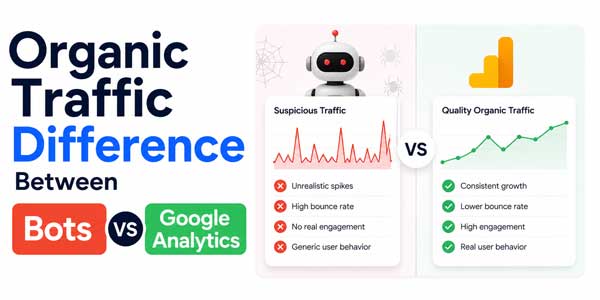
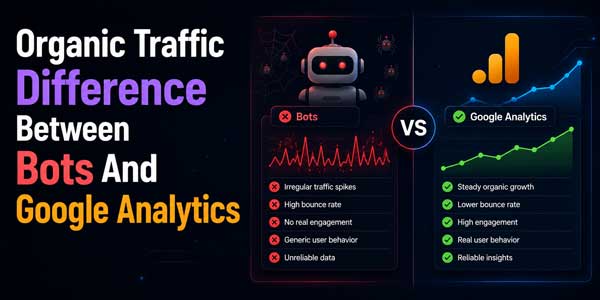
Third-party bots are not the same as organic visitors. Crawlers from SEO platforms, uptime tools, search engines, scrapers, malware scanners, and AI systems may request your pages without becoming GA4 users. Many bots do not run JavaScript, accept cookies, or behave like real visitors.
Server logs usually show more activity than GA4 because they record every request. That includes CSS files, images, scripts, crawlers, bots, previews, scanners, and repeated requests from the same machine. GA4 is narrower because it focuses on events from user-like browser activity.
Some bots do execute JavaScript and may appear in analytics. These sessions often have poor engagement, odd locations, strange screen sizes, no conversions, high bounce behavior, or repeated landing pages. GA4 has bot filtering, but no filter catches every automated visit perfectly.
Spam can enter through fake referrers, suspicious organic sources, automated browsers, or malformed campaign data. If you see an unfamiliar source/medium driving sudden traffic with zero engagement, inspect it before counting it as growth. Good SEO reporting should separate real demand from noise.
Bot-influenced traffic often has abnormal patterns. Watch for traffic from unexpected countries, single-page sessions, identical session durations, no scrolling, no conversions, strange hostnames, repeated browser versions, and landing pages that do not match your SEO strategy.
Do not remove data blindly. First create comparisons. Look at engagement rate, key events, revenue, landing page quality, and source/medium patterns. If the traffic has no business value and behaves unnaturally, mark it as suspect and consider filters, exclusions, or reporting annotations.
How To Audit Organic Traffic Differences Step By Step
A proper audit starts with definitions. Decide which metric you are comparing: GA4 organic sessions, GA4 organic users, Search Console clicks, server log visits, or third-party estimated traffic. Write that definition at the top of your report so everyone understands the comparison.
Next, match date ranges and filters. Use the same start date, end date, country, device, search engine, and landing page group where possible. A mobile-only Search Console filter should not be compared with all-device GA4 organic sessions. Small reporting mismatches can create large disagreements.
Then validate tracking. Use Tag Assistant, browser developer tools, real-time reports, GTM preview mode, and test visits from Google search where possible. Confirm that GA4 loads on every template, including blog posts, category pages, product pages, AMP pages, landing pages, and localized versions.
Review redirect paths. Organic users may pass through HTTP to HTTPS redirects, www to non-www redirects, language redirects, trailing slash rules, app deep links, or tracking redirects. If a redirect breaks referrer data or delays the page too long, GA4 may undercount organic sessions.
Check landing page coverage. Export top pages from Search Console and compare them with GA4 landing pages from Organic Search. Any high-click GSC page with very low or missing GA4 data deserves a manual tag test. It may have a missing tag, blocked script, or template issue.
- Export Search Console clicks by landing page for the selected date range.
- Export GA4 organic sessions by landing page for the same date range.
- Export external SEO tool estimated traffic by page or keyword group.
- Compare only matching URLs after normalizing slashes, parameters, case, and protocols.
- Annotate website releases, tracking updates, content changes, and search volatility.
Finally, summarize the gap. Do not say “GA4 is wrong” unless you found a tracking defect. Say what the gap means. For example: “Search Console clicks are 28% higher than GA4 organic sessions on blog pages, mostly because the cookie banner blocks analytics until consent.” That is a useful diagnosis.
How To Build Better SEO Reports With Mixed Data Sources
The best SEO reports do not force every tool to match. They give each tool a job. Use GA4 for user behavior, engagement, conversions, revenue, and landing page quality. Use Search Console for Google Search visibility. Use third-party bots for competitive research, keyword opportunities, backlinks, and crawl intelligence.
Separate actual performance from estimated opportunity. Actual performance includes GA4 sessions, engaged sessions, conversions, revenue, and Search Console clicks. Estimated opportunity includes keyword volume, ranking potential, traffic forecasts, competitor traffic estimates, and content gap projections.
Make this distinction clear for clients and managers. A third-party SEO tool may show that a competitor gets 50,000 estimated organic visits, but that number is not verified analytics data. It is a model. Useful, yes. Exact, no. The same is true for your own estimated traffic inside SEO platforms.
Use consistent naming in reports. Avoid mixing “traffic,” “clicks,” “visits,” “sessions,” and “users” as if they mean the same thing. If a chart uses GA4 sessions, label it as GA4 organic sessions. If another chart uses tool estimates, label it as estimated organic traffic.
Add notes when data changes. GA4 channel grouping updates, consent mode changes, search algorithm volatility, website migrations, bot spikes, and reporting delays can all affect trend lines. A small note beside a chart can prevent a long meeting full of confusion.
Final Thoughts: Use Differences To Find Better Answers
The organic traffic difference between third-party bots and Google Analytics is not a reporting failure by itself. It is a reminder that each tool sees a different layer of the search journey. Bots estimate visibility. Search Console measures Google Search activity. GA4 measures on-site user behavior.
When those numbers disagree, treat the gap as a clue. It may reveal missing tags, privacy loss, bot noise, weak attribution, redirected traffic, long-tail visibility, or a keyword model that does not match your real audience. The value comes from diagnosing the cause, not forcing the numbers to match.
For accurate SEO decisions, build a reporting system that respects the purpose of each data source. Use GA4 to understand what users do after arrival. Use Search Console to understand Google Search demand. Use third-party SEO tools to understand the market, competitors, and ranking opportunities.
Clean reporting builds better decisions. Once your team understands why the numbers differ, you can stop arguing over dashboards and start improving the pages, keywords, technical setup, and content strategy that actually drive organic growth.
Frequently Asked Questions
Why Does Organic Traffic Differ Between Third-Party Bots And Google Analytics?
Organic traffic differs because third-party bots usually estimate visits from rankings, keyword data, and crawls, while Google Analytics counts tracked user activity after the GA tag loads. Different data sources, metrics, timing, privacy limits, and attribution rules create natural gaps.
Is Google Analytics More Accurate Than SEO Tools For Organic Traffic?
Google Analytics is usually more accurate for on-site user behavior, sessions, engagement, and conversions. SEO tools are better for estimated visibility, keyword research, competitor analysis, and ranking opportunities. They answer different questions, so neither should replace the other.
Why Are Search Console Clicks Higher Than GA4 Organic Sessions?
Search Console may count a click from Google Search even if the user leaves before GA4 loads, blocks tracking, rejects cookies, or loses referrer data through redirects. GA4 only records the visit when its tracking setup successfully fires and classifies the session.
Can Bots Inflate Organic Traffic In Google Analytics?
Yes, some automated browsers and spam systems can appear in analytics if they execute JavaScript and trigger events. Check engagement, countries, landing pages, source patterns, conversions, and server logs to decide whether a spike is real user demand or bot-influenced noise.
How Often Should I Audit Organic Traffic Differences?
Review high-level differences monthly and after every major website change, tracking update, migration, cookie banner change, or SEO campaign launch. For large sites, weekly checks are better because tracking issues can hide quickly inside templates, redirects, and page groups.








Be the first to write a comment.