
For more than a decade, Cordova-based hybrid mobile app frameworks have helped web developers transform HTML, CSS, and JavaScript applications into installable mobile apps. Apache Cordova became one of the technologies that made cross-platform mobile development accessible to developers who did not want to maintain separate native Android and IOS codebases.
But the mobile development landscape has changed dramatically. Flutter, React Native, Capacitor, Progressive Web Apps, Kotlin Multiplatform, and modern native frameworks now compete for developer attention, while many developers assume Cordova has become obsolete.
That assumption is only partly correct. Apache Cordova is still actively maintained: Cordova Android 15.1.0 was released on July 22, 2026, while Cordova IOS 8.1.1 arrived on July 7, 2026. The project therefore remains technically alive and capable of targeting modern mobile platforms.
The more useful question is not simply “Is Cordova dead?” It is whether learning or using Cordova still provides enough business and technical value compared with modern alternatives.
Key Takeaway: Cordova is no longer the automatic choice for a new cross-platform mobile application, but it remains valuable for maintaining existing applications, leveraging web development skills, supporting specialized plugin ecosystems, building internal tools, and modernizing large hybrid codebases gradually.
Table of Contents
What Cordova-Based Hybrid Mobile Development Actually Means
Apache Cordova allows developers to build mobile applications primarily with HTML, CSS, and JavaScript. Instead of rendering every interface element through native Android or IOS components, the application typically runs its web interface inside a native WebView container.
Cordova then provides a bridge between JavaScript and native device functionality. Features such as cameras, files, geolocation, notifications, network information, accelerometers, and other native capabilities can be exposed through plugins. Apache describes Cordova as wrapping HTML and JavaScript applications inside native containers while exposing device functions through JavaScript APIs.
This architecture created one of Cordova’s biggest advantages: developers could reuse web development knowledge instead of learning entirely separate native mobile stacks.
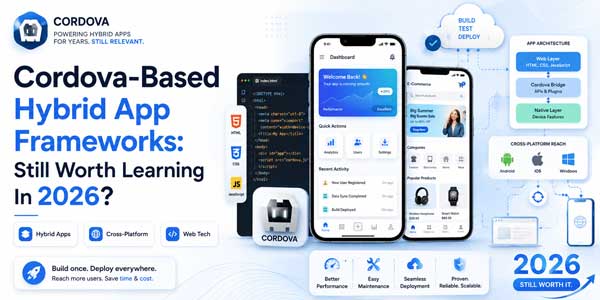
A simplified Cordova architecture looks like this:
- Presentation Layer: HTML, CSS, JavaScript, Vue, React, Angular, or another web UI technology.
- Native Container: An Android or IOS shell hosting the application.
- WebView: The browser-like environment that renders the user interface.
- Cordova JavaScript Bridge: The communication layer between web code and native functionality.
- Plugins: Native extensions providing access to device-specific APIs.
It is important to distinguish Apache Cordova itself from UI frameworks that can run on top of Cordova. Cordova primarily provides the native runtime and bridge. Frameworks such as Ionic, Framework7, Onsen UI, and Quasar can provide interface components, routing, design systems, development conventions, and additional tooling.
Is Apache Cordova Still Alive In 2026?
Yes. Apache Cordova remains maintained in 2026, although its position in the broader mobile ecosystem has changed significantly.
Cordova CLI 13.0.0 was released in November 2025. Apache followed with major Android platform updates in 2026, including Cordova Android 15.0.0 and 15.1.0. The Android 15 generation introduced compatibility work involving newer Android SDK requirements, Gradle, Android WebView behavior, edge-to-edge interfaces, permissions, keyboard handling, and back navigation.
IOS development also continues. Cordova IOS 8.0.0 was released in November 2025, followed by 8.0.1, 8.1.0, and 8.1.1 during 2026. These releases addressed modern WKWebView behavior, build tooling, Swift Package Manager compatibility, status bar functionality, and other platform issues.
This matters because one of the strongest arguments against Cordova has historically been fear of platform abandonment. The project is clearly not frozen.
However, technical maintenance does not automatically make a technology the strongest strategic choice for greenfield development. A framework can remain functional while another ecosystem becomes more productive, better supported, or more attractive for hiring.
Why Cordova Still Has Practical Value
The strongest case for Cordova today is not hype, novelty, or developer fashion. It is economics, existing infrastructure, and code reuse.
Existing Cordova Applications Still Need Developers
Thousands of organizations built Cordova and PhoneGap applications during the explosive growth of hybrid mobile development. Many of those applications contain years of business logic, API integrations, authentication flows, payment systems, offline functionality, analytics, and proprietary plugins.
Replacing such an application purely because a newer framework exists may create enormous migration costs without generating equivalent business value.
For these teams, a developer who understands Cordova architecture, plugins, WebViews, JavaScript-native communication, Android builds, IOS builds, and migration strategies can still be valuable.
Web Development Skills Transfer Quickly
A developer comfortable with modern frontend development already understands much of the application layer required for Cordova. HTML, CSS, TypeScript, JavaScript, API communication, state management, authentication, responsive layouts, and component architecture remain relevant.
This can significantly reduce the learning curve for internal applications, proof-of-concept products, enterprise utilities, and applications where the interface behaves more like a web application than a graphics-intensive native experience.
One Codebase Can Reduce Maintenance Complexity
Hybrid development was created partly to address a fundamental business problem: maintaining separate Android and IOS development teams can be expensive.
When requirements are relatively straightforward, a shared web-based application layer can reduce duplicated engineering effort. The organization may still need native knowledge for plugins and platform-specific problems, but much of the product experience can remain shared.
Existing Plugins Can Protect Previous Investment
Organizations sometimes have custom Cordova plugins written specifically for hardware, enterprise systems, scanners, printers, authentication technologies, Bluetooth devices, or proprietary SDKs.
Rewriting those integrations can cost more than maintaining the original Cordova architecture. This is particularly important in enterprise mobility, logistics, healthcare operations, field-service software, manufacturing, retail systems, and internal business applications.
Which Cordova-Based Frameworks Are Still Relevant?
Cordova should not be evaluated in isolation. Several web frameworks and mobile UI systems can still participate in Cordova workflows.
Apache Cordova
Apache Cordova remains the foundation. Developers can build applications directly with Cordova while choosing their own frontend technology.
Direct Cordova development provides substantial architectural freedom, but it also means the developer is responsible for selecting UI libraries, navigation systems, state management, project structure, and many other application-level decisions.
It is most appropriate when:
- A company already maintains a substantial Cordova application.
- A project depends heavily on existing Cordova plugins.
- The development team has strong web engineering experience.
- Migration costs outweigh potential benefits.
- The application has limited animation or graphics requirements.
Ionic With Cordova
Ionic became one of the most recognizable UI ecosystems associated with Cordova. It provides mobile-focused interface components while allowing developers to use familiar web technologies.
Modern Ionic development, however, has shifted strongly toward Capacitor. Ionic documentation describes Capacitor as the modern native runtime while still acknowledging Cordova compatibility in parts of the ecosystem. Ionic’s documentation also describes support for deploying with Capacitor or Cordova.
Therefore, someone starting a completely new Ionic project should normally investigate Capacitor first. Cordova knowledge remains useful mainly for legacy Ionic applications, plugin compatibility, maintenance, and migration work.
Framework7 With Cordova
Framework7 remains a web-focused framework designed for building mobile-style applications with IOS and Android-inspired interfaces. Its documentation continues to contain Cordova-aware functionality, including initialization around Cordova’s deviceready lifecycle.
Framework7 can be attractive when developers want strong control over HTML-based interfaces and a mobile-oriented component system without adopting a heavier application architecture.
It is particularly useful for:
- Rapid prototypes.
- Mobile-first web applications.
- Hybrid applications.
- Applications using Vue or other supported frontend approaches.
- Teams with strong web design and frontend skills.
Onsen UI With Cordova
Onsen UI provides mobile-oriented components designed for hybrid and Progressive Web App development. Its official documentation still contains a dedicated Cordova workflow and explains how existing Onsen applications can be packaged as Android or IOS applications using Cordova.
The framework can work with technologies including React, Vue, and other web approaches, making it useful when an organization already has Onsen-based products.
For a new project, however, ecosystem activity, team expertise, future hiring requirements, and long-term maintenance should be evaluated before making it the default architecture.
Quasar With Cordova
Quasar is particularly interesting because its modern documentation continues to provide both Capacitor and Cordova development modes. Its mobile documentation explicitly describes both technologies as mechanisms for running web applications in native mobile environments.
This gives Vue-oriented development teams flexibility. A business maintaining Cordova integrations does not necessarily need to abandon its existing deployment architecture immediately, while new projects can evaluate Capacitor.
Where Cordova Remains A Strong Business Choice
Cordova becomes more attractive when business constraints favor reuse and predictable delivery over architectural novelty.
Consider Cordova seriously when working on the following types of projects:
- Legacy Enterprise Applications: Existing applications containing significant Cordova-specific code or plugins.
- Internal Business Tools: Employee portals, inspection apps, field-service tools, inventory systems, and administrative utilities.
- Content-Heavy Applications: Applications dominated by forms, dashboards, articles, catalogs, lists, or account management.
- Offline Business Workflows: Applications where local storage, synchronization, and forms matter more than advanced graphics.
- Specialized Hardware Integrations: Existing custom Cordova plugins may make migration expensive.
- Budget-Constrained Maintenance: Businesses may receive little measurable return from rebuilding a stable product.
- Gradual Modernization Projects: Teams can improve frontend code first and migrate the native runtime later.
The economic principle is simple: technology migration should solve a measurable problem. Rewriting an application simply because another framework is newer can consume months of engineering capacity while producing almost no additional customer value.
Where Cordova Becomes The Wrong Choice
Cordova’s limitations become more important as product requirements become more native, interactive, graphics-heavy, or performance-sensitive.
High-Performance Interfaces Can Become Difficult
Modern WebViews are substantially more capable than early mobile browsers, but WebView-based applications still operate under different constraints from fully native rendering engines.
Complex animations, large interactive datasets, advanced gestures, intensive background processing, real-time graphics, video manipulation, sophisticated camera experiences, augmented reality, and gaming can expose architectural limitations.
If 60 or 120 frames-per-second interaction quality is central to the product’s value proposition, another technology may provide a safer foundation.
Plugin Dependency Can Become Technical Debt
A Cordova application may rely on numerous third-party plugins. Every plugin becomes another dependency that must remain compatible with Android, IOS, WebView changes, SDK requirements, permissions, and build tools.
An abandoned plugin can transform a routine platform upgrade into a substantial engineering task.
This is why Cordova developers should understand at least basic Java, Kotlin, Objective-C, Swift, Android Studio, and Xcode concepts. Treating Cordova as a system that eliminates native development entirely is a mistake.
Modern Platform Changes Require Continuous Maintenance
Mobile operating systems evolve continuously. Android permissions, target SDK requirements, edge-to-edge layouts, back navigation, WebView behavior, privacy requirements, and IOS build tooling can all change.
Cordova Android 15.x itself demonstrates this reality through updates involving permissions, Android SDK changes, keyboard behavior, back gestures, and system bars.
A hybrid application therefore requires active technical ownership even when its business functionality appears unchanged.
Cordova Vs Capacitor Vs React Native Vs Flutter
The best development framework depends on product requirements rather than popularity rankings. The following comparison provides a practical strategic view.
| Technology | Primary Development Model | Best Fit | Main Consideration |
|---|---|---|---|
| Cordova | Web Application Inside Native WebView | Legacy Apps, Enterprise Tools, Existing Plugins | Plugin And Platform Maintenance |
| Capacitor | Modern Web-To-Native Runtime | New Web-Based Mobile Apps | Usually Stronger Greenfield Choice Than Cordova |
| React Native | JavaScript With Native UI Integration | Consumer Apps And React Teams | More Native-Oriented Development Complexity |
| Flutter | Dart With Custom Rendering Engine | Rich Cross-Platform UI Experiences | Requires Learning Dart And Flutter Architecture |
| Native Android And IOS | Platform-Specific Development | Maximum Platform Control | Higher Multi-Platform Engineering Cost |
For developers who specifically want to build new mobile applications using web technologies, Capacitor generally deserves investigation before Cordova. Ionic created Capacitor as a modern successor to the older Cordova-centered workflow and provides compatibility with many existing Cordova plugins.
That does not mean Capacitor automatically eliminates Cordova everywhere. Legacy dependencies, custom plugins, deployment infrastructure, testing investment, and organizational knowledge can make continued Cordova development economically rational.
Should Beginners Learn Cordova In 2026?
A beginner should probably not make Cordova their only mobile development specialization. The career value is stronger when Cordova knowledge sits inside a broader cross-platform development skill set.
A more resilient learning path would be:
- Learn Modern JavaScript And TypeScript. Understand asynchronous programming, modules, APIs, promises, application architecture, and browser fundamentals.
- Master A Major Frontend Framework. React or Vue skills remain reusable across websites, hybrid applications, PWAs, and other frontend systems.
- Understand Mobile UX. Learn navigation patterns, touch targets, gestures, safe areas, mobile accessibility, network limitations, and offline behavior.
- Learn How Cordova Works. Understand WebViews, plugins, deviceready, configuration, builds, permissions, debugging, and native bridges.
- Learn Capacitor. This gives web developers exposure to a more modern web-to-native workflow.
- Gain Basic Native Knowledge. Learn enough Android Studio, Kotlin, Xcode, and Swift to diagnose platform problems.
This approach turns Cordova into a useful capability rather than a career dependency.
How To Decide Whether Your Project Should Still Use Cordova
A practical architecture decision should begin with the existing product rather than the framework.
- Audit The Current Codebase. Identify application size, frontend framework, Cordova version, native modifications, build configuration, and technical debt.
- Inventory Every Plugin. Determine which plugins are actively maintained and which have become migration risks.
- Identify Custom Native Code. Proprietary Cordova plugins can significantly affect migration cost.
- Measure Actual Performance Problems. Do not rebuild an application because of hypothetical performance concerns.
- Review Product Roadmap Requirements. Determine whether upcoming features require deeper native functionality.
- Calculate Migration Cost. Include redevelopment, QA, analytics validation, authentication, payments, regression testing, store releases, and staff training.
- Estimate Maintenance Savings. Compare future Cordova maintenance against the cost of migration.
- Choose Based On Return On Investment. Modernization should improve delivery speed, reliability, product capability, or long-term operating cost.
If an existing Cordova application is stable, profitable, maintainable, and capable of supporting upcoming requirements, continuing to maintain it can be more rational than rewriting it.
If the team is repeatedly blocked by incompatible plugins, outdated dependencies, difficult platform upgrades, poor performance, or expensive workarounds, migration becomes easier to justify.
Should Existing Cordova Apps Migrate To Capacitor?
For many web-centric applications, Capacitor is the most natural migration destination. It preserves the broader concept of using web technologies inside a native application while providing tighter alignment with modern native development workflows.
Ionic specifically positions Capacitor as the successor to Cordova and documents compatibility with a large portion of Cordova plugins, which can reduce the cost of transition.
However, migration should still be treated as an engineering project rather than a package replacement.
Teams should test:
- Authentication and deep linking.
- Push notifications.
- Camera and media functionality.
- File system access.
- Background processes.
- Biometric authentication.
- Bluetooth integrations.
- Custom Cordova plugins.
- Analytics and attribution SDKs.
- Payments and subscriptions.
- Offline storage and synchronization.
A sensible strategy is often incremental migration instead of a complete rewrite. Upgrade the web application architecture, remove abandoned plugins, introduce automated testing, isolate native integrations, and migrate the runtime once the dependencies are understood.
Security And Maintenance Considerations For Cordova Apps
Security should be one of the strongest reasons to maintain a Cordova application actively rather than leaving it untouched for years.
A Cordova application combines web technologies with native device permissions. Poorly managed dependencies, unsafe WebView configuration, insecure content loading, outdated plugins, weak Content Security Policy rules, or unnecessary permissions can create avoidable risk.
Teams should regularly:
- Upgrade supported Cordova platform versions.
- Review plugin maintenance status.
- Remove unused plugins and permissions.
- Apply a restrictive Content Security Policy.
- Avoid loading untrusted remote JavaScript into privileged contexts.
- Update npm dependencies and native SDK integrations.
- Test against current Android and IOS releases.
- Monitor security announcements affecting Cordova plugins.
The Cordova project continues releasing plugin fixes and platform updates, reinforcing the importance of treating hybrid mobile applications as actively maintained software rather than static web packages.
The Future Of Cordova-Based Hybrid Development
Cordova is unlikely to regain its historical position as the dominant recommendation for new hybrid mobile applications. The ecosystem has moved toward newer solutions, and Capacitor in particular addresses many of the same web-development use cases with a more modern native workflow.
But describing Cordova as useless would ignore how enterprise software actually evolves.
Technology rarely disappears immediately. Successful applications can remain operational for many years, and rebuilding them introduces cost, risk, and opportunity loss. As long as businesses maintain Cordova applications, developers who understand both Cordova and modern migration paths will have practical value.
The most strategically useful skill is therefore not merely knowing how to run cordova build. It is understanding the complete hybrid application model: WebViews, native bridges, plugins, frontend architecture, mobile performance, security, Android and IOS deployment, and modernization.
Final Verdict: Is Cordova Still Valuable To Learn And Use?
Yes, but with an important qualification. Cordova is still valuable to learn when you maintain legacy hybrid applications, support enterprise software, work with existing Cordova plugins, or need to understand the history and architecture of web-based mobile development.
For most completely new consumer-facing applications, Cordova should no longer be selected automatically. Teams should compare it carefully with Capacitor, React Native, Flutter, Progressive Web Apps, and native development according to their performance requirements, developer expertise, plugin dependencies, budget, roadmap, and expected product lifetime.
For beginners, Cordova works best as an additional skill layered on top of modern JavaScript, TypeScript, frontend development, mobile UX, and basic native knowledge.
For organizations with existing Cordova products, the decision should be even more pragmatic: do not rewrite functioning software merely because the technology is older. Migrate when the business case, product roadmap, security requirements, maintenance cost, or platform limitations justify the investment.
That distinction explains Cordova’s real position in 2026. It is no longer the center of cross-platform mobile development, but neither is it irrelevant. It has evolved from a default development choice into a specialized maintenance, enterprise, migration, and web-to-mobile technology skill.
Everyday Reader Frequently Asked Questions
Is Apache Cordova Still Used In 2026?
Yes. Apache Cordova continues to receive platform and plugin updates, including Android and IOS releases during 2026. It is used primarily for maintaining existing hybrid applications, enterprise software, specialized plugin integrations, and projects where rewriting the current application would provide limited business value.
Is Cordova Dead Or Discontinued?
No. Apache Cordova has not been discontinued. The Apache project continues publishing updates for its mobile platforms and plugins. However, Cordova is less dominant for new mobile development than it was historically because alternatives such as Capacitor, Flutter, and React Native have become widely adopted.
Should I Learn Cordova Or Capacitor?
If you are starting from scratch, learning Capacitor first is generally more useful for modern web-based mobile development. Learning Cordova remains valuable if you expect to maintain legacy Ionic or Cordova applications, work with existing Cordova plugins, or handle migrations from Cordova to newer architectures.
Is Cordova Good For Large Mobile Apps?
Cordova can support substantial applications, particularly content-heavy and enterprise products, but suitability depends on performance requirements and plugin complexity. Applications requiring advanced graphics, intensive animations, sophisticated native integrations, or highly optimized native experiences may benefit from another architecture.
What Is The Best Alternative To Apache Cordova?
Capacitor is often the closest alternative because it also allows developers to build mobile applications with web technologies while integrating with native platforms. React Native and Flutter are strong alternatives when richer cross-platform mobile interfaces or different rendering architectures are required.













Be the first to write a comment.