
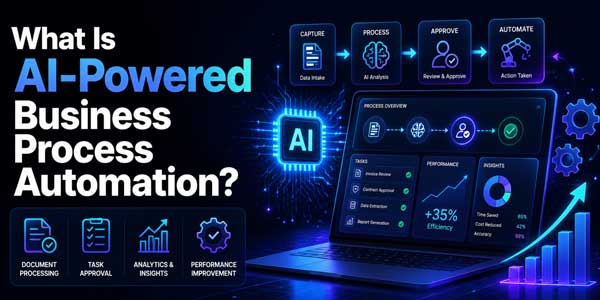
Companies are always seeking to increase efficiency without increasing costs. Manual work, disparate systems, and redundant processes can impede teams and drain productivity. This is where AI-powered business process automation is having a real impact.
In contrast to traditional automation, AI can process information, extract meaning, understand context, and make reasoned decisions. It enables companies to automate more complicated workflows as well as do so faster, accurately, and with a better customer experience.
In this blog, we will cover what AI-powered business process automation is, why it matters, and how your business can get started.
Table of Contents
What Is AI-Powered Business Process Automation?
AI is transforming industries, and business process automation leverages AI and machine learning to automate business workflows with minimal human intervention. Unlike traditional automation that relies on predefined rules, AI analyzes data, identifies patterns, learns from experience, and adapts to changing business conditions.
- Learns from data: Continuously analyzes historical and real-time data to improve process accuracy over time.
- Recognizes patterns: Identifies trends, anomalies, and recurring behaviors that rule-based systems may overlook.
- Adapts to changing conditions: Responds intelligently to new scenarios without requiring extensive manual reprogramming.
- Automates complex workflows: Handles multi-step business processes with minimal human involvement.
- Improves document processing: Reads invoices and other business documents, extracts key information, and validates data automatically.
How Does AI Workflow Automation Improve Business Operations?
Business workflows enable coordination between functions like sales, HR, finance, and customer service to ensure the business runs smoothly daily.
1.) Automation of Repetitive Tasks:
AI performs these basic, repetitive tasks, such as task assignment, notifications, record updates, report generation, etc. This represents less manual work and allows people to spend their time doing more strategically focused creative work and decision-making. This leads to greater productivity and efficiency within teams.
2.) Minimizes Manual Data Entry:
AI captures, validates, and transfers data into business systems from various sources automatically, rather than requiring manual input. This improves efficiencies by eliminating duplicative efforts and maintaining up-to-date and consistent information across departments.
3.) Improves Accuracy and Reduces Errors:
AI executes tasks according to set rules and with high consistency and low deviation. It helps to create fewer errors in data processing, approvals, and paperwork, improve compliance, as well as the reliability of the overall process.
4.) Accelerates Approvals and Removes Bottlenecks:
AI assigns relevant stakeholders to incoming requests, manages reminders, and tracks the status of approvals. It also finds lagging workflows to help organizations clear bottlenecks and speed processes up.
5.) Predicts Workflow Outcomes:
Leveraging past information, AI can predict delays, give estimated completion dates, and flag problems before they happen. It assists companies in resource allocation and process continuity.
6.) Enables Faster Business Decisions:
AI helps generate real-time analytical insights and performance data, allowing managers to make informed decisions at a faster pace. The quicker one has access to correct information, the more efficient it leads to in operations and ultimately within the business.
What Steps Should You Follow to Get Started with AI-Powered Business Process Automation?
Automation, particularly with AI, should be taken in a structured way rather than attempting to automate everything at once. A step-by-step approach gives organizations the ability to minimize risks and get results faster, as well as build a solid foundation from which to automate successfully in the long term.
Step 1: Identify Repetitive Processes
Look for processes that take up large amounts of employee time when the work being done involves repetitive tasks based on rules. Processes like data entry, approvals, document handling, and ticket routing are often good candidates for AI automation because they are predictable and measurable.
Step 2: Define Business Objectives
Decide how you want to use AI automation before attempting to use it. These may include objectives such as decreasing processing time, cutting costs, increasing customer satisfaction, increasing productivity or reducing manual errors. Clear goals allow for a better possibility of measuring success.
Step 3: Evaluate Existing Systems
Take stock of your existing software, databases, and business processes and what they do. Understanding potential integration points as well as possible technical constraints will help provide a good fit with your existing technology landscape.
Step 4: Choose the Right Automation Approach
Choose an automation tool that matches the level of complexity inherent in your business processes. Some workflows benefit from AI-powered or agentic automation that can decide, analyze, and coordinate inputs and tasks across different systems.
Step 5: Build a Pilot Project
Don’t try to automate the whole organization at once. Start with one business process. Running a pilot project allows you to validate your results, collect feedback, measure ROI, and work through challenges before deploying AI automation at scale across other departments.
Step 6: Measure Performance
Track KPIs such as processing time, cost, error rates, employee productivity, and customer satisfaction. Periodic performance evaluation helps streamline the use of AI processes and allows for continuous iteration.
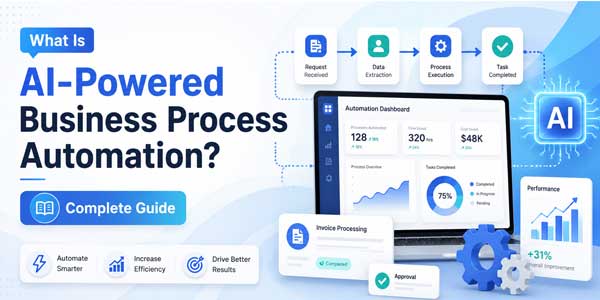
Use Cases Of AI Workflow For Different Industries:
Nearly every department can benefit from automation using AI. Among the most ubiquitous examples of usage are:
Customer Service:
AI automation enables customer service teams to quickly and effectively deal with repetitive queries. It can answer FAQs, classify support requests, route tickets to the appropriate agents, and suggest solutions during conversations. This reduces response times, improves customer satisfaction, and allows support staff to focus on complex issues.
Finance:
Finance functions deploy AI to automate invoicing, approving expenses, payment verification, and financial reporting. AI is also used in spotting suspicious transactions and detecting fraud before it becomes an issue. With less manual work and fewer errors, finance can spend more time on planning and decision-making.
Human Resources:
AI streamlines HR functions like resume screening, interview scheduling, and onboarding. It also provides support for payroll, personnel records, and other daily HR documentation. It is a time saver in improving the efficiency of hiring and providing employees with a smoother experience.
Sales and Marketing:
AI is also being applied in marketing and sales, where it can help teams qualify leads, tailor outreach to customers, and automate follow-up messages. It also refreshes CRM systems and analyzes customer behavior for targeting. These capabilities enhance engagement and conversion and allow sales teams to spend time on the most valuable opportunities.
Operations
Operational teams are using AI to automate processes such as inventory tracking, order processing, supply chain monitoring, and compliance reporting. AI also accelerates internal approvals and offers insights into real-time operations. This increases efficiency, lowers costs, and promotes more uniform business practices.
Healthcare:
Healthcare relies on AI workflow automation to handle things like patient scheduling and records, insurance claims and coding, and appointment reminders. AI is also helping with document management, patient questions, and administrative duties so that health care providers have more time for their patients. This creates greater productivity and a better patient experience.
Banking and Financial Services:
AI in finance automates the processing of loans and credit, payment and transaction verification, fraud detection, regulatory compliance and customer support, among other uses. Smart workflows process financial information in real-time, minimize the need for manual verification, and expedite approvals. This helps banks tighten security, lower costs, and speed service.
How Does Low Code Workflow Automation Accelerate AI Adoption?
Automation has been viewed, and rightly so, as something that requires a long software development cycle, so companies are loath to approach it.
That is no longer the case.
Low-code workflow automation enables orgs to create automated workflows using a visual interface instead of writing thousands of lines of code.
Business users can link together prebuilt software components, integrate existing applications, and set automation rules using tools that require minimal coding experience.
Low-code platforms, when applied to AI, democratize automation for more teams.
Benefits include:
- Quicker implementation
- Reduced cost of development
- Simplified workflow updates
- Lower reliance on large developer teams
- Speedier experimentation and innovation
Developers are free to build on advanced functionality, but business users can handle daily workflow enhancements on their own.
What Challenges Should Businesses Expect During AI Implementation?
As helpful as the workflows automated by AI can be, organizations might struggle with adopting them. Below are some of the major reasons why AI fails when implementing it for automating business tasks:
- Resistance to change: Overcome this challenge by making sure employees understand how AI can help them do their work and should not be seen as a threat, by training and incorporating AI in their daily tasks.
- Integration with Legacy Systems: Select AI applications that can integrate with your legacy systems and evaluate your tech stack before deploying.
- Bad Data Quality: Business data must be accurate, complete, and organized, as AI systems base their decisions on the input data to provide good results.
- Undefined Business Goals: Establish measurable goals and key performance indicators (KPIs) to measure the success of AI before its implementation.
- Security and Compliance Issues: Ensure that you have controls in place for data governance, access, and regulatory compliance to protect sensitive business information.
Conclusion:
The use of AI to automate business processes is changing how companies function. Intelligent decision-making, paired with automation, can help companies synthesize processes, minimize manual work, and yield higher productivity in every department within a company.
Be it low-code workflow automation to implement quickly or investing in developing custom AI agents with services, begin with clear business objectives and scale from there.
Businesses that implement these technologies today will be in a better position to compete, innovate, and grow in a digital marketplace not only because of the benefits of workflow automation, but also because of the increased competitiveness brought to them by AI workflow automation and agentic AI workflow automation.
 About the Author:
I am Himanshu Chowdhary. My core expertise lies in AI Development, along with Digital Transformation and Software Development. I also write on Search Engine Optimization, Digital Marketing, and Social Media Marketing, breaking down complex concepts into clear, easy-to-understand ideas across different themes.













Be the first to write a comment.