
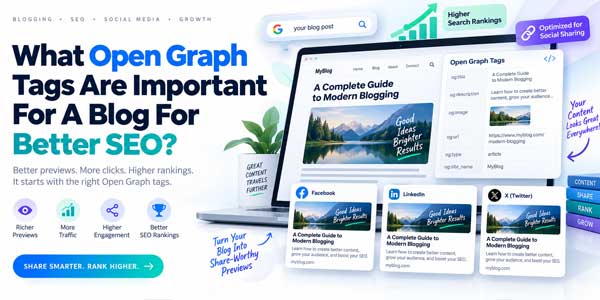
When someone shares your blog post on Facebook, LinkedIn, messaging apps, social networks, or other platforms, the link does not have to appear as a plain URL. With the right Open Graph tags, it can become a rich preview containing a carefully selected image, headline, description, website name, and canonical URL.
That difference matters. A professionally presented link can attract more attention, communicate the topic faster, strengthen brand recognition, and potentially increase the number of people who click and share your content.
Open Graph metadata is therefore an important part of blog SEO, social media optimization, content distribution, and technical website configuration. However, there is an important misconception to clear up immediately: Open Graph tags are primarily designed for rich social previews, not as a traditional Google ranking system.
Google does not treat having more Open Graph tags as a shortcut to higher rankings. However, Google confirms that og:title can be one of several sources it considers when generating a title link in search results, while strong social previews can indirectly support content discovery, brand visibility, referral traffic, sharing, and click-through behavior.
Quick Recommendation: Every important blog post should at minimum define
og:title,og:type,og:image,og:url, and a usefulog:description. For articles, also consider publication metadata, image dimensions, image alternative text, site name, locale, and platform-specific card tags.
This guide explains which Open Graph tags are most important for a blog, what each property does, how Open Graph affects SEO indirectly, how to implement tags correctly, how Open Graph differs from normal SEO metadata and schema markup, and how to troubleshoot broken social previews.
Table of Contents
What Are Open Graph Tags?
The Open Graph protocol is a metadata standard that allows a webpage to describe how it should be represented when shared as a rich object on supported platforms. The protocol was originally created at Facebook and is now widely implemented across websites and publishing systems.
Open Graph tags are normally added inside the <head> section of an HTML document using <meta> elements.
A simple example looks like this:
<meta property="og:title" content="How To Improve WordPress SEO" />
<meta property="og:type" content="article" />
<meta property="og:url" content="https://example.com/wordpress-seo-guide/" />
<meta property="og:image" content="https://example.com/images/wordpress-seo-guide.jpg" />
When a compatible crawler encounters these tags, it can use the metadata to build the link preview users see when the page is shared.
The official Open Graph specification defines four fundamental properties:
og:title: The title of the object.og:type: The type of content being represented.og:image: The image representing the page.og:url: The permanent URL representing the object.
For practical blog publishing, however, those four tags are only the foundation.
Do Open Graph Tags Directly Improve Google Rankings?
This question needs a precise answer because Open Graph is frequently described incorrectly as a direct SEO ranking feature.
Adding Open Graph markup does not automatically make a blog post rank higher. Open Graph was designed primarily to describe how content appears in social contexts.
However, Open Graph can still matter to SEO in several indirect and technical ways.
- More attractive previews can produce additional referral traffic.
- Clear previews can increase sharing opportunities.
- Consistent metadata strengthens branding.
- Strong distribution can expose content to people who may later link to it.
og:titlecan be one of the sources Google considers when generating title links.- A consistent
og:urlhelps social platforms associate engagement with the intended URL.
That last distinction is important. Google Search Central documents several possible sources used when generating title links, including the HTML <title>, visible page headings, prominent text, anchor text, and og:title.
That does not make og:title a conventional ranking factor. It means Open Graph metadata can participate in how Google understands or presents certain page information.
The Five Most Important Open Graph Tags For A Blog
For most blogs, five properties should be treated as the core implementation.
1. Og:title
og:title controls the headline associated with the shared page.
<meta property="og:title" content="10 Proven Ways To Improve WordPress Performance" />
Your Open Graph title should accurately represent the article while remaining compelling enough to earn attention in a social feed.
A strong title should:
- Match the actual content.
- Communicate the benefit quickly.
- Contain the main topic naturally.
- Avoid misleading clickbait.
- Remain concise enough for social previews.
You do not necessarily need to make og:title identical to the HTML <title>, but the two should describe the same content.
For example, your SEO title might contain a concise site-brand suffix while your social title focuses entirely on the article.
2. Og:type
og:type tells the receiving system what kind of object the page represents.
For a blog article, use:
<meta property="og:type" content="article" />
For a homepage or general website page, you would normally use:
<meta property="og:type" content="website" />
The distinction is useful because the Open Graph protocol provides additional properties specifically for article content.
3. Og:image
og:image is arguably the most visually important Open Graph property because the featured image often occupies most of the preview card.
<meta property="og:image" content="https://example.com/images/open-graph-seo-guide.jpg" />
Use an absolute HTTPS URL rather than a relative file path.
A strong Open Graph image should:
- Clearly relate to the article.
- Have sufficient resolution.
- Remain readable after cropping or resizing.
- Use strong visual hierarchy.
- Avoid placing important text too close to the edges.
- Use consistent brand styling.
A practical cross-platform approach is to create a wide social-share image around a 1.91:1 aspect ratio. A commonly used implementation is approximately 1200 × 630 pixels, although individual platform rendering can change and should always be tested.
4. Og:url
og:url identifies the URL representing the Open Graph object.
<meta property="og:url" content="https://example.com/open-graph-tags-blog-seo/" />
This should normally point to the preferred public version of the article rather than a tracking URL, preview URL, staging domain, AMP variant, parameterized URL, or shortened link.
Your Open Graph URL should generally align with the page’s intended canonical URL.
5. Og:description
Although the core Open Graph specification’s minimum set revolves around title, type, image, and URL, og:description is extremely useful in practical social sharing.
<meta property="og:description" content="Learn which Open Graph tags every blog should use to create better social previews, improve click-through potential, and strengthen content distribution." />
The description should quickly explain why someone should open the link.
Avoid copying generic boilerplate such as:
“Welcome to our website. Click here to learn more.”
Create a description specific to the article.
Important Open Graph Image Tags You Should Add
An og:image URL alone can work, but additional structured image properties give crawlers more useful information.
The official Open Graph protocol supports:
og:image:urlog:image:secure_urlog:image:typeog:image:widthog:image:heightog:image:alt
Og:image:width And Og:image:height
Specify the dimensions of your image when possible.
<meta property="og:image:width" content="1200" />
<meta property="og:image:height" content="630" />
Providing dimensions can help crawlers understand the asset without having to derive everything from the image file itself.
Og:image:type
You can specify the MIME type of the image:
<meta property="og:image:type" content="image/jpeg" />
Other common values may include image/png or another supported image format.
Og:image:alt
The official Open Graph specification states that if a page specifies og:image, it should also specify og:image:alt.
<meta property="og:image:alt" content="Illustration showing Open Graph metadata generating a rich social media preview" />
The value should describe what is actually visible in the image rather than functioning as another marketing headline.
Think of it as descriptive metadata, not a keyword field.
Use Og:site_name For Stronger Blog Branding
og:site_name communicates the name of the overall website or publication.
<meta property="og:site_name" content="Example Tech Blog" />
This can help social platforms distinguish the article title from the publication that owns the content.
For example:
- Article: Best WordPress Security Plugins For 2026
- Site: Example Tech Blog
Keep the site name consistent across your website, structured data, brand assets, and other relevant metadata.
Use Og:locale For Language And Regional Context
If your blog targets a particular language and locale, you can use og:locale.
<meta property="og:locale" content="en_US" />
Other examples include:
en_GBfr_FRde_DEes_ES
Multilingual sites can also define alternate locales:
<meta property="og:locale:alternate" content="fr_FR" />
<meta property="og:locale:alternate" content="de_DE" />
Do not confuse Open Graph locale properties with SEO hreflang. They solve different problems.
Use proper hreflang implementation for search-engine language targeting. Open Graph locale metadata primarily describes the social object.
Article Open Graph Tags Every Serious Blog Should Consider
When og:type is set to article, additional article-specific properties become available.
The most useful properties include:
article:published_timearticle:modified_timearticle:authorarticle:sectionarticle:tag
Article:published_time
This identifies when the article was originally published.
<meta property="article:published_time" content="2026-09-06T09:00:00+05:00" />
Use a valid machine-readable date and time format, ideally including the timezone.
Article:modified_time
If the article has been meaningfully updated, you can provide a modified date.
<meta property="article:modified_time" content="2026-09-06T12:00:00+05:00" />
Do not artificially change modification timestamps every day simply to make old content appear fresh.
Article:author
This property can identify the author associated with an article.
<meta property="article:author" content="https://example.com/author/jane-doe/" />
Your author information should also be clear inside the visible article itself.
Article:section
This can identify a high-level category:
<meta property="article:section" content="Technical SEO" />
Use meaningful editorial sections rather than stuffing multiple keywords into the property.
Article:tag
You can associate topical tags with the article:
<meta property="article:tag" content="Open Graph" />
<meta property="article:tag" content="Technical SEO" />
<meta property="article:tag" content="Social Media Optimization" />
This is not a replacement for normal SEO keyword research or on-page content.
Open Graph Tags Versus SEO Meta Tags
Open Graph metadata and traditional SEO metadata overlap conceptually, but they have different primary purposes.
| Element | Primary Purpose | Main Audience |
|---|---|---|
| <title> | Page Title And Search Presentation Signal | Browsers And Search Engines |
| Meta Description | Potential Search Snippet Description | Search Engines |
| Rel=”canonical” | Canonical URL Preference | Search Engines |
| Open Graph Tags | Rich Social Sharing Metadata | Social And Messaging Platforms |
| Schema.org Structured Data | Machine-Readable Content Meaning | Search Engines And Other Consumers |
Do not remove your normal SEO metadata because Open Graph tags exist.
A strong blog page commonly uses all of the following:
- HTML
<title>. - Meta description.
- Canonical URL.
- Robots directives where necessary.
- Open Graph metadata.
- X/Twitter card metadata.
- Article or BlogPosting structured data.
Og:url Is Not A Replacement For Rel=”canonical”
This is an important technical SEO distinction.
og:url identifies the Open Graph object’s primary URL for social representation.
The HTML canonical element is specifically used to indicate your preferred URL to search engines:
<link rel="canonical" href="https://example.com/open-graph-tags-guide/" />
You should normally keep them aligned:
<link rel="canonical" href="https://example.com/open-graph-tags-guide/" />
<meta property="og:url" content="https://example.com/open-graph-tags-guide/" />
Google documents rel="canonical" as a strong canonicalization signal. Do not assume that og:url performs the same search-engine function.
Open Graph Tags Versus Schema Markup
Another common mistake is assuming Open Graph and schema markup are interchangeable.
They are not.
Open Graph primarily helps platforms create rich representations of shared URLs.
Schema.org structured data provides explicit machine-readable information about entities and content types.
For a blog post, Google supports Article-related structured data such as:
ArticleNewsArticleBlogPosting
A simplified blog schema might include:
<script type="application/ld+json">
{
  "@context": "https://schema.org",
  "@type": "BlogPosting",
  "headline": "What Open Graph Tags Are Important For A Blog?",
  "image": [
    "https://example.com/images/open-graph-blog-guide.jpg"
  ],
  "datePublished": "2026-09-06T09:00:00+05:00",
  "dateModified": "2026-09-06T12:00:00+05:00",
  "author": {
    "@type": "Person",
    "name": "Jane Doe",
    "url": "https://example.com/author/jane-doe/"
  }
}
</script>
Google explicitly states that Article structured data can help it better understand article information such as the title, images, dates, and authorship.
For serious blog SEO, use Open Graph and Article structured data together rather than choosing between them.
Should You Add X Or Twitter Card Tags Too?
Yes. If your content is likely to be shared on X, adding platform-specific card metadata is sensible.
A common large-image configuration is:
<meta name="twitter:card" content="summary_large_image" />
<meta name="twitter:title" content="Open Graph Tags Every Blog Should Use" />
<meta name="twitter:description" content="Learn the essential Open Graph tags for better social previews and stronger blog distribution." />
<meta name="twitter:image" content="https://example.com/images/open-graph-blog-guide.jpg" />
<meta name="twitter:image:alt" content="Diagram showing a blog post transformed into a rich social preview" />
X’s current card specifications support wide website card imagery around a 1.91:1 aspect ratio, which is another reason a carefully designed wide featured image can work well across several channels.
Using explicit card tags also gives you more control over how the page is represented on that platform.

The Ideal Complete Open Graph Setup For A Blog Post
A practical implementation can look like this:
<title>Open Graph Tags For Blogs: Complete SEO Guide</title>

<meta name="description"
      content="Learn the Open Graph tags every blog should use for better social sharing, stronger previews, and SEO support." />

<link rel="canonical"
      href="https://example.com/open-graph-tags-blog-seo/" />

<meta property="og:title"
      content="Open Graph Tags Every Blog Should Use" />

<meta property="og:type"
      content="article" />

<meta property="og:url"
      content="https://example.com/open-graph-tags-blog-seo/" />

<meta property="og:description"
      content="Learn how to configure Open Graph metadata for better blog previews, click-through potential, and social sharing." />

<meta property="og:image"
      content="https://example.com/images/open-graph-tags-guide.jpg" />

<meta property="og:image:type"
      content="image/jpeg" />

<meta property="og:image:width"
      content="1200" />

<meta property="og:image:height"
      content="630" />

<meta property="og:image:alt"
      content="Open Graph metadata creating a rich social preview for a blog article" />

<meta property="og:site_name"
      content="Example Tech Blog" />

<meta property="og:locale"
      content="en_US" />

<meta property="article:published_time"
      content="2026-09-06T09:00:00+05:00" />

<meta property="article:modified_time"
      content="2026-09-06T12:00:00+05:00" />

<meta property="article:author"
      content="https://example.com/author/jane-doe/" />

<meta property="article:section"
      content="Technical SEO" />

<meta property="article:tag"
      content="Open Graph" />

<meta property="article:tag"
      content="Blog SEO" />

<meta name="twitter:card"
      content="summary_large_image" />

<meta name="twitter:title"
      content="Open Graph Tags Every Blog Should Use" />

<meta name="twitter:description"
      content="Learn which Open Graph tags create stronger blog previews and improve content distribution." />

<meta name="twitter:image"
      content="https://example.com/images/open-graph-tags-guide.jpg" />
You do not need to manually paste this into every article if your CMS or SEO plugin generates the metadata dynamically.
How To Add Open Graph Tags In WordPress
WordPress users normally have three implementation options.
Use An SEO Plugin
Major WordPress SEO plugins can generate social metadata automatically based on your post title, featured image, canonical URL, description, and other settings.
Typical options include:
- Yoast SEO.
- Rank Math.
- All In One SEO.
- Other dedicated SEO or social-sharing plugins.
Before installing another plugin, check whether your existing SEO system already outputs Open Graph metadata.
Running multiple plugins that generate the same tags can create duplicates.
Add Open Graph Tags Through Your Theme
Developers building a custom WordPress theme can dynamically generate metadata using WordPress functions and the post’s actual information.
The values should come from:
- The current article title.
- The permalink.
- The featured image.
- The excerpt or SEO description.
- The publication date.
- The modified date.
- The author archive or profile.
- The primary category.
Avoid hardcoding the same metadata across every article.
Use Custom Fields When Social Copy Needs To Differ
Advanced editorial systems can provide dedicated fields for:
- Social title.
- Social description.
- Social image.
This lets editors create a Google-focused SEO title while using a more visual or conversational headline for social sharing.
How To Design The Best Open Graph Image
Technical markup cannot compensate for an ineffective creative.
The featured image should work like an advertisement for the article without becoming misleading.
A strong Open Graph creative often includes:
- A single clear visual concept.
- High contrast.
- Large readable typography if text is used.
- A short headline rather than the entire article title.
- Recognizable brand elements.
- Enough empty space around important content.
Avoid Tiny Text
Social cards are often displayed on smartphones. Text that looks readable on a 27-inch monitor can become almost invisible on mobile.
Keep any image headline short and large.
Avoid Repeating Too Much Information
If the social card already displays the article title beneath the image, the image does not necessarily need to contain the full title again.
You could instead use:
OPEN GRAPH SEO GUIDE
rather than fitting a twenty-word article headline into the artwork.
Keep Critical Content Away From The Edges
Platforms can crop imagery differently depending on feed layout, device, and card format.
Keep logos, faces, product images, and important text inside a safe central area.
How Open Graph Can Improve Content Click-Through Potential
Imagine two people share the same useful article.
The first preview shows:
- No image.
- A broken headline.
- An outdated description.
- An unclear domain.
The second shows:
- A professional featured image.
- A clear benefit-driven title.
- A concise description.
- Consistent branding.
Both links lead to identical content, but the second communicates much more value before the click.
This is why Open Graph should be treated as part of content distribution optimization.
It improves the packaging around the content.
Common Open Graph Mistakes That Blogs Should Avoid
- Missing Og:image: Shared links can appear visually weak.
- Using The Same Image Everywhere: Every post should ideally have a relevant visual.
- Using A Relative Image URL: Prefer complete absolute HTTPS URLs.
- Using Tiny Images: Low-resolution images can render poorly.
- Missing Og:image:alt: The protocol recommends providing descriptive alternative text when using an Open Graph image.
- Wrong Og:type: Blog posts should normally use
article. - Incorrect Og:url: Avoid parameterized or staging URLs.
- Conflicting Canonicals: Keep your intended canonical and Open Graph identity logically aligned.
- Duplicated Tags: Multiple SEO plugins can create conflicting metadata.
- Stale Cached Previews: Social platforms may continue displaying previously crawled metadata.
- Using Development URLs: Never publish production metadata pointing to localhost or staging domains.
- Hardcoding One Description Site-Wide: Create page-specific metadata.
How To Test Open Graph Tags Before Sharing A Post
Do not assume your metadata is correct simply because it exists in the source code.
Use a validation process before important launches.
- View The HTML Source. Confirm that the expected metadata is actually present.
- Check For Duplicate Tags. Verify that plugins or themes are not outputting competing values.
- Open The Image URL Directly. Confirm that it loads publicly without authentication.
- Check HTTPS. Use secure production asset URLs.
- Verify Og:url. Confirm that it points to the intended article URL.
- Verify Canonical. Make sure the canonical configuration is intentional.
- Use Platform Preview Tools. Test how relevant platforms interpret the page.
- Test A Real Share. Check the actual preview on desktop and mobile where practical.
If a preview still shows an old image or title, the platform may have cached an earlier version.
Updating the HTML alone does not always immediately refresh a previously cached social card.
Should Every Blog Post Have A Unique Open Graph Image?
Ideally, important articles should have their own relevant social image.
A unique image provides several benefits:
- It gives each article a distinct identity.
- It helps users distinguish several posts shared together.
- It communicates the article topic visually.
- It improves brand presentation.
- It makes content repurposing easier.
For very large publishers, creating bespoke graphics for every single URL may not be practical.
A scalable alternative is to build dynamic templates that combine:
- Article title.
- Category.
- Featured visual.
- Brand logo.
- Consistent background treatment.
The result can still be unique without requiring a designer to manually create every social image.
Open Graph Tags Priority Checklist For Bloggers
If you are implementing Open Graph from scratch, use this priority system.
Essential Tags
og:titleog:typeog:imageog:urlog:description
Highly Recommended Tags
og:image:widthog:image:heightog:image:typeog:image:altog:site_nameog:locale
Recommended For Blog Articles
article:published_timearticle:modified_timearticle:authorarticle:sectionarticle:tag
Recommended Supporting SEO Metadata
- HTML title.
- Meta description.
- Canonical URL.
- Article or BlogPosting schema.
- X or Twitter card metadata.
A Better Technical SEO Workflow For Every New Blog Post
Open Graph should not be managed separately from the rest of your publication workflow.
Create one repeatable checklist.
- Write A Strong Article Title.
- Create The SEO Title.
- Write A Unique Meta Description.
- Confirm The Permalink.
- Set The Canonical URL.
- Create The Featured Image.
- Generate Open Graph Metadata.
- Generate X Card Metadata.
- Generate BlogPosting Or Article Schema.
- Check The Publication And Modified Dates.
- Validate Metadata.
- Test The Social Preview.
- Publish And Share.
Once this is automated inside your CMS, most of the process should require very little additional editorial work.
Final Verdict On Open Graph Tags For Blog SEO
Open Graph tags are important for blogs, but they should be understood correctly.
They are primarily social-sharing metadata, not a magic Google ranking mechanism. Their biggest value comes from controlling how your content is represented when URLs are shared across social and messaging environments.
The essential implementation starts with og:title, og:type, og:image, and og:url. For real-world blog publishing, add og:description as well.
Then strengthen your implementation with og:image:width, og:image:height, og:image:type, og:image:alt, og:site_name, and og:locale.
For article pages, publication time, modification time, author, section, and article tags can provide additional context.
Most importantly, keep Open Graph metadata aligned with the rest of your technical SEO stack.
Your page should still have a proper HTML title, unique meta description, intentional canonical URL, crawlable content, useful internal links, optimized images, and relevant structured data.
Google currently documents og:title as one possible source when generating search title links, but search presentation should still be driven primarily by clear page titles and content. Google also treats rel="canonical" as a meaningful canonicalization signal, while Article structured data can explicitly describe article headlines, images, authors, and dates.
The best strategy is therefore not Open Graph versus SEO. It is Open Graph plus strong technical SEO, structured data, great content, and thoughtful social distribution working together.
Everyday Reader Frequently Asked Questions
What Open Graph Tags Are Most Important For A Blog?
The most important Open Graph tags are og:title, og:type, og:image, and og:url, which form the core Open Graph metadata set. Blogs should also add og:description, image dimensions, image alternative text, site name, locale, and appropriate article metadata.
Do Open Graph Tags Improve Google SEO?
Open Graph tags are primarily designed for social sharing rather than direct search rankings. However, they can support SEO indirectly through better content distribution and referral traffic, and Google documents og:title as one of several possible sources used when generating search-result title links.
What Size Should An Open Graph Image Be?
A wide image around a 1.91:1 aspect ratio is a practical cross-platform choice for blog sharing. A commonly used implementation is approximately 1200 × 630 pixels, but you should test important previews because platforms can crop and render images differently.
Should Og:url Match The Canonical URL?
For a normal blog article, they should usually identify the same preferred public page. However, og:url is Open Graph metadata while rel="canonical" is the appropriate HTML mechanism for indicating your canonical preference to search engines.
Do I Need Both Open Graph Tags And Schema Markup?
Yes, they serve different purposes. Open Graph primarily controls rich social representations, while structured data such as BlogPosting or Article helps search engines understand information such as headlines, images, dates, and authorship more explicitly.













Be the first to write a comment.