
Product demo videos are a cornerstone of modern SaaS marketing, onboarding, and customer education. They help users understand workflows, feature value, and buying decisions — fast. But most teams hit the same roadblock:
Recording audio is hard.
- Good narration takes practice. Poor audio quality makes even great visuals feel amateur.
- Hiring voice talent or spending hours with a mic and editing suite feels expensive and slow.
Luckily, AI has changed the game.
Modern tools can now create professional demo videos without recording any audio yourself — often with automated scripts, built-in voiceovers, captions, and polished visuals.
In this article, we’ll show you exactly how it works and how you can create demo videos faster than ever before.
Table of Contents
Why Skip Manual Audio Recording?
Before AI, teams had two options:
- Record their own narration
- Hire professional voice talent
Both come with problems:
- Skill barrier: Not everyone is comfortable speaking on camera or mic.
- Time drain: Rerecording imperfect takes adds hours to production.
- Costs: Professional voice talent and studios are expensive.
Modern AI tools eliminate these issues by generating narration from text, scripts, or directly from screen recordings — automatically.
How AI Generates Demo Video Narration Without Recording Audio?
Here’s the step-by-step behind the scenes:
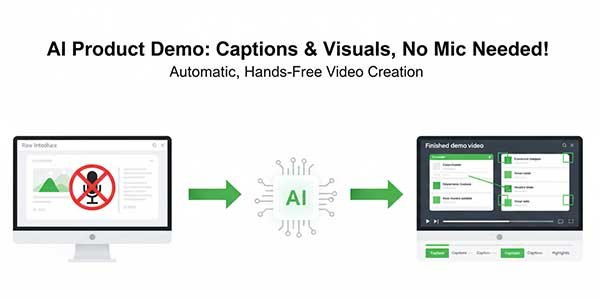
Screen Recording Is Captured:
You start with a raw recording of your product in action.
This captures:
- Click flows
- UI navigation
- Feature usage
- Gestures on screen
No mic. No interruptions needed.
AI Script Generator Analyzes the Recording:
Advanced AI tools examine your screen recording and detect:
- Key steps
- UI elements
- Action sequences
- Natural pauses
From this, they auto-generate a script that explains your product logically and clearly. This script functions as a narration backbone.
Instead of manually writing lines, the AI does the heavy lifting.
Some platforms like VideoMule combine script creation and narration generation in one flow, so you don’t juggle multiple tools.
Natural Voiceover Is Added Automatically:
Once the script is created, the AI converts the text into speech. Many platforms provide choices for:
- Voice tone
- Accent
- Gender
- Speed
You can even choose a voice that fits your brand style — without recording a single line yourself.
Final Video Output Is Polished:
AI tools go beyond basic narration. They often include:
- Captions
- Zooms and highlight effects
- Intro/outro branding
- Automatic transitions
Your final demo video no longer feels raw or unpolished — it looks professional.
Popular AI Tools for Audio-Free Demo Videos:
Several tools today allow you to generate product demo videos without recorded audio:
- VideoMule – Upload screen recordings and automatically generate scripts and narration.
- NarrateAI – Upload silent recordings and get auto voiceovers without manual recording.
- Pictory – Uses AI to turn text and visuals into demo videos with optional audio.
- Storyship – AI product demo maker with in-built voiceover and template workflows.
- HeyGen – Text-to-video generation with AI voiceover and avatars.
These tools vary in features, but all remove the need to record audio manually.
Step-by-Step: Creating a Demo Video Without Recording Audio
Here’s a practical workflow you can follow:
Step 1: Plan Your Demo Flow
Define what you want the viewer to learn or do. This improves clarity and ensures the AI script stays focused.
Example:
- Show how to log into the product
- Navigate to the dashboard
- Generate a report
Step 2: Record Your Screen
Use a screen recorder like Screen Studio, Loom, or even your browser’s built-in screen capture.
Don’t worry about audio — just capture visuals cleanly.
Step 3: Upload to an AI Video Platform
Choose a tool that supports auto script generation and AI voiceover. Drag and drop your screen recording.
Step 4: Let the AI Generate a Script
The platform will process your video, identify logical steps, and output a written narration. You can often edit this text to fit your tone or style.
Step 5: Choose a Voice & Generate Audio
Pick from a range of AI voices — neutral, professional, friendly, instructional, and more. The AI will sync the narration to match the screen flow.
Step 6: Add Visual Enhancements (Optional)
Many tools allow:
- Captions
- Highlights
- Zoom-ins
- Callouts
These make your demo easier to follow and more engaging.
Step 7: Export and Publish
Once everything looks good, export the video in your desired format. You can upload it to:
- Your website
- Product pages
- YouTube or Vimeo
- Email campaigns
- Knowledge base articles
Real World Tips from Creators:
Many product marketers struggle with traditional demo videos because:
- They keep redoing audio takes
- Audio timing doesn’t match screen actions
- Videos feel unpolished and amateur
One creator reported they tried multiple takes, editors, and even voice actors — until they discovered AI tools that handled the narration automatically. Instead of spending hours improving one video, they now produce multiple demos per week with consistent quality.
It’s not just about convenience — it boosts engagement and conversion because the narrative becomes clearer and more professional.
What to Watch Out For?
Using automatic voiceovers and AI scripts is powerful, but not flawless:
- AI may misinterpret complex UI context
- Voice tone matters for certain audiences
- You may need to refine scripts for technical content
Always review the generated script before final narration for accuracy.
Final Thoughts:
Demo videos don’t have to be painful.
You no longer need:
- A quiet room
- A microphone
- Multiple retakes
- Expensive voice talent
- Hours in an editing suite
With AI-driven platforms, you can create professional demo videos from screen recordings — no audio recording required.
This approach saves time, cuts costs, improves consistency, and lets your team focus on value, not production.
If you want to skip audio recording entirely and still produce high-quality product demo videos, AI tools with auto script generation and voiceover are the future.
 About the Author:Ananda Raman is an SEO Analyst and digital content specialist who works at the intersection of SaaS, AI, and content strategy. He helps creators and businesses improve search visibility and streamline content production, often exploring practical tools like VideoMule to simplify video creation and workflow automation.












Be the first to write a comment.